Starting a Discord community from nothing is one of the most ambitious and rewarding things you can do online. When it works, you've created a space where people genuinely connect, help each other, and build something bigger than any individual could alone. When it doesn't, you've built an echo chamber for yourself with 47 inactive members.
This guide walks you through the entire process of creating a Discord community that people actually want to be part of, from the very first decision to a self-sustaining community that thrives without you being online 24/7.
Step 1: Define Your Community Before You Create It
The most common mistake is opening Discord, creating a server, and then trying to figure out what it's for. Do the thinking first. Before you build anything, identify your specific niche - "a server about gaming" won't work, but "a server for speedrunners of retro platformers" will. Write a short description of your ideal member, including their interests, experience level, and what problems your community solves for them. Then articulate your value proposition by completing this sentence: "You should join my community because ___." If your answer is just "to chat about the topic," you need to go deeper. Strong value propositions might include expert feedback within 24 hours, weekly tournaments with prizes, or being the only active community for your specific niche. This preparation ensures you attract the right people, create relevant content, and stand out from millions of other servers.
Find Your Niche
"A server about gaming" isn't a community. "A server for speedrunners of retro platformers" is. The narrower your focus, the easier it is to:
- Attract the right people
- Create relevant content and events
- Stand out from the millions of other servers
- Build genuine expertise and authority
That said, don't go so narrow that your potential audience is 12 people. There's a sweet spot between "too broad" and "too specific" that you need to find based on your topic.
Identify Your Audience
Write a short description of your ideal member:
- What are their interests?
- What's their experience level?
- What age range are they likely in?
- What other communities do they participate in?
- What problems or needs would your community solve for them?
This isn't about excluding people. It's about understanding who you're building for so you can make decisions that serve them well.
Articulate Your Value Proposition
Complete this sentence: "You should join my community because ____."
If your answer is just "to chat about [topic]," you need to go deeper. Strong value propositions include:
- "...because you'll get expert feedback on your work within 24 hours"
- "...because we run weekly tournaments with prizes"
- "...because it's the only active community for [specific niche]"
- "...because our members have collectively helped 500 beginners land their first job in [field]"
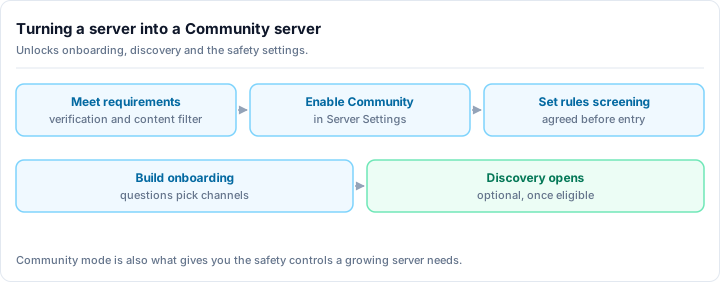
Step 2: Server Setup
Now open Discord. Here's how to set up a server that makes a good first impression.
Server Settings
- Name: Clear, memorable, and descriptive. If someone sees the name in their server list, they should immediately remember what it's about.
- Icon: Custom design that represents your community. Even a simple logo made with free tools is better than the default letter.
- Banner: If you have Nitro features, add a banner. It makes the server feel established.
- Description: Write a clear, concise description for Discord's server discovery.
Channel Structure
Start minimal. Seriously. You can always add channels later, but you can never un-create the impression of a ghost town with 30 empty channels.
Minimum viable channel structure:
INFORMATION
  #rules
  #announcements
  #introductions

YOUR TOPIC
  #general-discussion
  #resources
  #help-questions

SOCIAL
  #off-topic
  #media-share

VOICE
  General Voice
  Hangout
Channels to add later (when demand exists):
- Topic-specific channels (split from general when conversations consistently go off-topic)
- Event channels (when you start running events)
- Showcase channels (when members start sharing their work)
- Sub-topic channels (when your community naturally develops sub-groups)
For more detailed channel setup advice, check our Discord Server Templates guide.
Roles
Start with a simple role structure:
- Admin -- You and maybe one trusted co-founder
- Moderator -- For your moderation team (leave empty for now)
- Member -- For verified community members
- Optional: Interest-based roles that members can self-assign
Don't create an elaborate hierarchy of 15 roles on day one. That's for mature communities with real needs for permission differentiation.
Permissions
Lock down appropriately:
- Only admins can manage channels, roles, and server settings
- Moderators can manage messages, timeout members, and access mod channels
- Members can read and send messages in appropriate channels
- Everyone can see rules and announcements but not post in them
- Invite links are managed (not a free-for-all)
Onboarding Flow
A new member's first 60 seconds determines whether they stay:
- Rules agreement -- Use Discord's Rules Screening or a reaction-based system
- Introduction prompt -- Encourage new members to introduce themselves
- Role selection -- Let members pick interest roles to customize their experience
- Welcome message -- Either automated or personal, acknowledging their arrival
Make the onboarding process short. Every extra step loses members.
Step 3: Establish the Culture
Culture isn't something you declare; it's something you demonstrate. But you can set the stage.
Write Your Rules
Rules aren't just restrictions. They're a communication of your community's values. Write rules that:
- State what you value (respect, helpfulness, creativity, honesty)
- Define unacceptable behavior specifically
- Explain consequences clearly
- Include contact information for issues
For detailed rule-writing guidance, read our moderation guide.
Model the Behavior You Want
In the early days, you ARE the community. How you behave sets the precedent:
- Welcome every new member personally
- Ask questions and start discussions
- Be helpful when someone needs assistance
- Be respectful even when you disagree
- Share your own work or interests vulnerably
- Admit when you're wrong or don't know something
The first 50 members will mirror your energy. If you're welcoming, they'll be welcoming. If you're elitist, they'll be elitist.
Create Shared Experiences
Communities bond through shared experiences, not shared channels:
- Weekly events related to your topic (game nights, critique sessions, listening parties, study groups)
- Challenges and prompts that give members a reason to participate regularly
- Inside jokes and traditions that develop naturally and make the community feel unique
- Collaborative projects that members build together
Step 4: Seed Your Community
An empty server is a dead server. Before you promote publicly, you need a core group.
Invite Your Inner Circle
Personally invite 10-20 people who:
- Are genuinely interested in your topic
- Understand what you're trying to build
- Will actively participate and start conversations
- Can be patient during the slow early phase
Be honest with them: "I'm building a community about [topic] and I need a core group to get things started. Would you be willing to be active for the first few weeks while we grow?"
Manufacture Activity (Honestly)
This isn't about faking it. It's about creating the conditions for organic activity:
- Start conversations in your channels every day
- Share interesting content, resources, and links
- Ask genuine questions that prompt discussion
- Respond to everything anyone says in the early days
- Run your first event even if only 3 people show up
The Magic Number: 30
Research on online communities suggests that around 30 active members is where a community starts to become self-sustaining. Below that, it depends heavily on you. Above that, members start generating conversations independently. Your first milestone should be reaching 30 members who participate at least weekly.
Step 5: Promote and Grow
With a foundation in place, it's time to bring in new members. Our complete server growth guide and member acquisition guide cover this in depth, but here are the essentials:
Server Listings
List your server on discovery platforms with a compelling description and accurate tags. This provides steady, passive growth from people actively searching for communities like yours. Browse existing tags like community to see how other successful servers present themselves.
Content Creation
Create valuable content about your community's topic:
- Blog posts, guides, or tutorials
- Social media content (Twitter threads, TikTok, YouTube)
- Resources that your target audience would bookmark and share
The content attracts your audience. Your community gives them a place to discuss and connect.
Strategic Outreach
- Participate in related communities (subreddits, forums, other Discord servers)
- Partner with complementary communities for cross-promotion
- Reach out to content creators in your niche
- Attend or organize events where your target audience gathers
Word of Mouth
The most powerful growth channel is members who love your community enough to tell their friends. Create a community worth talking about, and growth takes care of itself eventually.
Step 6: Sustain and Scale
Once your community is growing, the challenge shifts from attraction to sustainability.
Build a Team
You can't do everything alone, and you shouldn't try:
- Recruit moderators from your most trusted, active members
- Appoint event coordinators who enjoy planning activities
- Identify community champions who naturally welcome and help new members
- Create a private staff channel for coordination and discussion
Develop Systems
Manual processes don't scale. Implement:
- Moderation bots for automated rule enforcement
- Welcome bots for consistent onboarding
- Event management systems for scheduling and reminders
- Feedback collection processes for understanding member needs
- Regular staff meetings for alignment and improvement
Maintain Quality as You Grow
Growth can dilute the qualities that made your community special:
- Review and update rules as the community evolves
- Adjust channel structure to accommodate new sub-topics without fragmenting
- Monitor the ratio of active to inactive members
- Celebrate long-time members so they don't feel forgotten in a wave of newcomers
- Stay true to your niche even as you're tempted to broaden for growth
Create Traditions
Communities that last have traditions:
- Monthly or annual events that members look forward to
- Recognition ceremonies for member achievements
- Seasonal activities tied to your topic
- Anniversary celebrations for the community itself
Plan for Your Absence
A healthy community doesn't depend on one person:
- Delegate authority to trusted team members
- Document processes so they can be followed by anyone
- Test your community's resilience by stepping back for short periods
- Have succession plans for key roles
Common Mistakes to Avoid
Over-Engineering at the Start
Don't spend three weeks setting up the perfect server before inviting anyone. Launch with the minimum viable structure, then iterate based on actual community needs.
Comparing to Established Communities
A 50-member server doesn't need the same structure as a 50,000-member server. Build for your current size, not the size you hope to be.
Ignoring Feedback
Your members will tell you what works and what doesn't. A suggestions channel that gets ignored is worse than not having one at all.
Being Too Hands-Off
Especially in the early days, your community needs you actively present. You can gradually step back as the community matures, but early abandonment kills communities.
Being Too Controlling
The flip side: don't micromanage every conversation or decision. Communities need room to develop organically. Your role is to create the conditions for healthy growth, not to control every aspect of the experience.
Focusing Only on Growth
A community of 100 members who love being there is better than a community of 10,000 who joined once and never came back. Prioritize depth over breadth, especially in the early stages.
The Emotional Reality of Community Building
Nobody talks about this enough: building a community is emotionally demanding.
- The early days are lonely. You're talking to yourself in empty channels.
- Growth is nonlinear. You'll have weeks of nothing followed by sudden bursts.
- Not everyone will stay. Members leaving is normal and doesn't mean you've failed.
- Conflict is inevitable. Two people you both like will eventually disagree, and you'll have to mediate.
- Burnout is real. Set boundaries. Take breaks. The community will survive a day without you.
The reward for pushing through these challenges is something genuinely rare: a group of people who gathered because of something you created and who built real connections because of the space you maintained.
Final Thoughts
Creating a thriving Discord community is part strategy, part art, and part endurance. The strategy is in this guide: define your niche, build the infrastructure, seed with real people, promote consistently, and scale sustainably. The art is in the thousands of small decisions you'll make about tone, rules, events, and culture. The endurance is in showing up every day, even when growth is slow and the channels are quiet.
Start today. Define your community. Set up the server. Invite your first 10 people. The rest is iteration.