Moderation is culture management, not just rule enforcement. In practice, most moderator burnout comes from inconsistent policy enforcement rather than the sheer volume of incidents - relitigating the same call over and over is what wears a team down. The difference between a healthy community and a toxic one often comes down to whether moderation feels fair and consistent.
This guide covers the three-tier moderation system - automod, human moderators, and admins - plus practical setup, scaling, and conflict-resolution strategies that actually work. It also covers the tooling that makes consistency possible, because fair enforcement at scale is impossible to do by hand.
Why Moderation Matters More Than You Think
Some server owners treat moderation as an afterthought, something to worry about only when problems arise. This is a mistake. Proactive moderation isn't about being authoritarian - it's about creating the conditions for a healthy community. Moderation is fundamentally culture management, not just rule enforcement. Without consistent, fair moderation, bad behavior drives out good members, leaving only those comfortable with toxicity. Your rules and how you enforce them communicate what your community values and attract members who share those values. The real cost of poor moderation isn't the volume of incidents moderators handle - it's the burnout that comes from inconsistent policy enforcement, relitigating the same call over and over. When moderation feels fair and consistent, members trust the system and participate safely. This guide covers the three-tier moderation system - automod, human moderators, and admins - plus the tooling that makes consistency possible, because fair enforcement at scale is impossible to do by hand.
Without moderation, bad behavior drives out good members. This is known as the "paradox of tolerance" in community building. If you tolerate everything, the toxic members stay and the good members leave because they don't want to deal with the toxicity.
Moderation sets the tone. Your rules and how they're enforced communicate what your community values. Consistent, fair moderation attracts members who share those values.
It protects vulnerable members. Every community has members who are younger, less experienced, or more vulnerable. Moderation ensures they can participate safely.
Part 1: Rules and Guidelines
Writing Effective Rules
Your server rules are the foundation of everything else. Good rules are:
Clear. Every member should understand what's expected. Avoid vague language like "be appropriate" or "don't be toxic" without defining what that means.
Specific. Instead of "no inappropriate content," try "no NSFW content outside of designated channels. This includes sexually explicit images, graphic violence, and content involving minors in any inappropriate context."
Justified. Briefly explain why each rule exists. Members are more likely to follow rules they understand the reasoning behind.
Enforceable. Don't create rules you can't or won't consistently enforce. Unenforced rules erode trust in all your rules.
Reasonable. Over-regulation kills communities just as effectively as under-regulation. Only create rules that serve the community's health.
Essential Rules Every Server Needs
-
Respect and civility. Define what this means: no personal attacks, no harassment, no discrimination based on identity, no doxxing, no threats.
-
Content guidelines. What's allowed and what isn't. NSFW policies, spam policies, self-promotion policies, AI-generated content policies.
-
Channel usage. Which channels are for what. Off-topic conversations in focused channels dilute their purpose.
-
Advertising and self-promotion. Whether and where members can promote their own content, services, or servers.
-
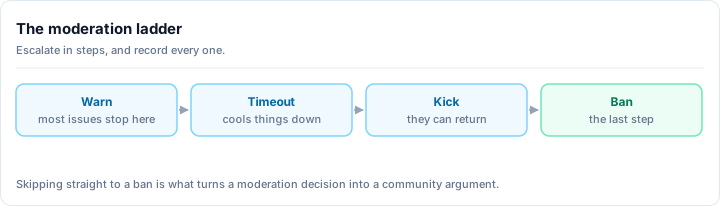
Enforcement consequences. What happens when rules are broken. Warnings, mutes, kicks, bans, and the escalation path between them.
-
Appeals process. How to appeal a moderation action. Even if the process is simple, having one builds trust.
Displaying Your Rules
- Post rules in a dedicated, visible channel (locked so only staff can post)
- Use Discord's Rules Screening feature to require agreement before participation
- Pin the most important rules in relevant channels where violations are common
- Keep the rules channel concise. Long, dense rule documents don't get read.
Part 2: Building a Moderation Team
When to Recruit Moderators
As a general rule:
- Under 100 members: You can moderate alone
- 100-500 members: You need 2-3 moderators
- 500-2,000 members: You need 4-8 moderators
- 2,000+ members: You need a structured team with leads
These numbers depend heavily on your community's activity level and topic. A high-activity gaming server needs more mods per member than a quiet book club.
Who Makes a Good Moderator
Look for members who:
- Are already active and respected in the community
- Stay calm under pressure - moderation involves dealing with angry, unreasonable people
- Are fair and consistent - they don't play favorites or let personal grudges influence decisions
- Understand the community culture - they know the difference between playful banter and genuine hostility
- Can separate personal opinions from rule enforcement - they enforce rules even when they personally disagree with a ruling
- Are available during off-peak hours - you need timezone coverage
- Can communicate clearly in writing - most moderation happens via text
Red Flags in Potential Moderators
- Members who want to be moderators for the power or status
- Members who have been involved in drama or conflict
- Members who are frequently argumentative with staff
- Members who play favorites within the community
- Members who can't handle criticism
Moderator Onboarding
Don't just give someone a role and hope for the best:
- Written guidelines outlining how to handle common situations
- Shadowing period where they observe experienced moderators
- Graduated permissions starting with muting and working up to banning
- Regular check-ins to discuss challenges and get feedback
- Clear escalation paths for situations they're not sure how to handle
Tiered roles make graduated trust real
Graduated permissions only work if your tools enforce them. With tiered moderator roles, a trial mod can warn and timeout but not ban, a senior mod can ban, and only admins can manage roles - so a new mod can't accidentally (or impulsively) take an action above their level. Rally Bot's tiered mod roles enforce an exact permission set per tier and quietly revert any manual change back to it, which keeps your hierarchy intact even as the team grows.
Preventing Moderator Burnout
Moderator burnout is real and common. Protect your team by:
- Setting expectations about time commitment - moderating shouldn't be a full-time job
- Rotating responsibilities so no one person handles all the hardest situations
- Providing a private staff channel for venting and mutual support
- Recognizing their contributions publicly and privately
- Allowing breaks without guilt or penalty
- Having enough moderators that no single person is indispensable
The point from the top of this guide is worth repeating here: most burnout comes from inconsistency, not workload. The single best burnout-prevention tool is a system that records every action and applies the same consequence every time, so no moderator has to relitigate the same decision twice.
Part 3: Tools and Systems
Discord's Built-In Tools
You do not need a bot to start moderating. Discord ships real moderation tools, and you should turn them on first:
AutoMod: Discord's native automoderation can:
- Block messages containing specific words or patterns
- Flag messages for moderator review
- Block spam and raid-like behavior
- Enforce mention limits
- Block links from unknown domains
Configure AutoMod before you need it. It handles the obvious violations so your human moderators can focus on nuanced situations.
Slowmode: Limits how frequently members can send messages in a channel. Useful for:
- High-traffic channels that become chaotic
- Heated discussions that need cooling
- Event channels during active events
- Preventing spam
Timeout: Temporarily restricts a member's ability to send messages, react, join voice, or create threads. Better than a kick for most minor violations because the member stays in the server but can't participate until the timeout expires.
Audit Log: Records all moderation actions (bans, kicks, role changes, channel edits). Review this regularly to ensure your team is acting consistently.
Where a Moderation Bot Adds Depth
Native tools cover the basics well. A moderation bot is what turns "we deleted a bad message" into "we have a consistent, documented enforcement system." The depth a good bot adds, on top of what Discord already does:
- Per-user case logs that track every warning, timeout, kick, and ban against a member, so a moderator can see someone's full history before acting.
- Automatic escalation that turns repeat infractions into the next consequence (warn, then timeout, then ban) without anyone having to remember where a user stands.
- Regex and pattern filtering beyond native keyword lists, to catch evasion like spaced-out slurs or obfuscated links.
- Tiered moderator roles with their own permission sets, so trust is graduated and enforced.
- Anti-raid newcomer screening that gates new accounts during a coordinated join wave.
- Message logging that captures edited and deleted messages for after-the-fact investigation.
- Timed actions that expire automatically, so a one-day mute is exactly one day.
The best Discord bots guide covers the full landscape, and the dedicated best Discord moderation bot breakdown compares the top options head-to-head.
The Recommended Setup: Rally Bot
For the moderation layer, the bot we recommend is Rally Bot - a complete, free, all-in-one bot managed entirely from one web dashboard, with no premium tier. Every feature is available to every server at no cost. On the moderation side that means:
- Automod - spam, link, mention-spam, and word filters, with regex support beyond native keyword lists.
- Tiered moderator roles - each tier carries an exact permission set, and the bot reverts any manual deviation back to it automatically.
- The full action ladder - warnings, timeouts, kicks, and bans, with timed actions that expire on their own.
- Anti-raid newcomer screening - automatic gating of suspicious new accounts during a join wave.
- Audit logging - every moderation action recorded with who, what, when, and why.
Because Rally Bot is all-in-one, the same dashboard also covers the rest of your stack - leveling, roles and welcome messages, engagement and utility features - so you are not stacking a separate bot for each job. (For how that consolidation plays out across every category, see the bots guide above.)
Free, and built to stay free
Rally Bot has no premium tier. Rally earns through its discovery platform - server boosts and featured placements - not by paywalling moderation depth. So the parts other bots reserve for premium (advanced automod, case logs, raid tooling) stay free here. Installing Rally Bot also lists your server on Rally's discovery platform, which ranks communities by real activity rather than bump counts, so a well-moderated, active server keeps surfacing to new members.
Add Rally Bot to your server - free, no credit card, no locked features.
Already running another moderation bot? The Dyno alternative guide covers what moving looks like in practice, including what to check before you switch.
Logging System
Set up a private logging channel (or set of channels) that captures:
- Edited and deleted messages
- User joins and leaves
- Role changes
- Channel permission changes
- Voice channel activity - who joined, left, or switched, and any voice channel status set or cleared
- All moderator actions with reasons
This log is essential for:
- Investigating incidents after the fact
- Reviewing moderator consistency
- Providing evidence for appeals
- Identifying patterns (repeat offenders, problematic time periods)
Part 4: Handling Common Situations
Spam
Remove the spam immediately
Delete the offending messages so they stop spreading and stop drawing replies.
Timeout or mute the source
Stop the account from posting more while you assess. A timeout is reversible if you got it wrong.
Check whether it is a bot account
New account, no prior activity, generic username, identical message in multiple channels - those are the tells of an automated spammer.
Act on the verdict
If it's a bot or a compromised account, ban it. If it's a real member who made a one-time mistake, warn them and explain which rule it broke.
Tune your filters
Add the pattern to your automod so the next instance is caught automatically rather than manually.
Toxicity and Harassment
- Document the behavior (screenshots of messages)
- Remove or hide offending messages
- Issue a warning for first offenses with a clear explanation of which rule was violated
- If the behavior continues, escalate to timeout, then mute, then ban
- Check DMs if the target reports private harassment (you can't moderate DMs, but you can ban based on evidence)
- Support the target - check in privately to make sure they're okay
This is exactly where per-user case logs earn their keep. Before you decide on a consequence, pull up the member's history: a first-ever slip and a fifth repeat offense deserve very different responses, and the log makes that call for you instead of relying on memory.
Raids
Discord raids (coordinated mass-joining and disruption) require fast action:
- Raise the verification level (require a verified email, a minimum account age, or server-membership duration before chatting)
- Lock high-traffic channels temporarily
- Use your bot's anti-raid newcomer screening to gate suspicious new accounts automatically
- Ban obvious raid accounts (new accounts with no history, joining in a burst)
- Don't engage - raiders want a reaction
- After the raid, review your server settings and automod to prevent a repeat
Anti-raid is a race against seconds
A raid can dump dozens of accounts into your server in under a minute, faster than any human team can ban by hand. This is the one area where automated screening is not a convenience but a requirement: newcomer screening that auto-gates a join wave buys your team the time to respond. If anti-nuke (a compromised admin deleting channels or mass-banning) is your specific fear rather than join-raids, that is a narrower threat with its own dedicated tooling - the server security guide covers where it fits.
Heated Debates
Not every argument is toxic. Passion is healthy; abuse is not.
- Monitor, don't intervene unless rules are being broken
- Use slowmode if the conversation is moving too fast for productive discussion
- Step in only when personal attacks, insults, or threats occur
- Redirect to a dedicated debate channel if the conversation is dominating the wrong channel
- If it can't be cooled down, lock the conversation and address it later when emotions have settled
Moderator Disagreements
Your team won't always agree. That's healthy, as long as it's managed:
- Never argue publicly about moderation decisions
- Discuss in private staff channels and reach consensus
- Default to the more lenient action when there's genuine disagreement (you can always escalate later)
- Defer to clear precedent when it exists
- Create new guidelines when a situation reveals a gap in your existing ones
Appeals
Every member should have the right to appeal a moderation action. A good appeals process:
- Member submits an appeal (via DM to a designated moderator, a form, or a ticket system)
- A different moderator than the one who issued the action reviews it
- The reviewer considers the evidence, context, and the member's history
- A decision is communicated clearly, with reasoning
- The decision is final after appeal (no infinite appeals loops)
A complete audit log is what makes appeals fair rather than a memory contest. The reviewer can see the exact action, the stated reason, and the member's prior record, and decide on facts instead of vibes.
Per-user case logs and a full audit trail are exactly what turn this from theory into practice - and they are part of Rally Bot's free moderation suite. Add Rally Bot to your server - free, one dashboard, no locked features.
Part 5: Advanced Moderation Strategies
Proactive vs. Reactive Moderation
Reactive moderation responds to problems after they occur. It's necessary but insufficient.
Proactive moderation prevents problems before they start:
- Engaging with new members early to set expectations
- Redirecting off-topic conversations before they escalate
- Addressing tension between members before it becomes conflict
- Adjusting channel settings seasonally or during high-activity periods
- Regular rule reviews and updates
Tone-Setting
Moderators set the tone of a community through their own behavior:
- Be the kind of member you want others to be
- Participate in discussions as a community member, not just as an authority figure
- Use humor and warmth, not just enforcement
- Acknowledge your own mistakes when you make them
- Show appreciation for positive contributions
Pattern Recognition
Experienced moderators develop an instinct for recognizing:
- Members who are testing boundaries gradually
- Friendship groups that are becoming exclusionary cliques
- Conversations that are heading toward conflict
- New members who might need extra support or attention
- Seasonal patterns in activity and behavior
Case logs turn that instinct into evidence. When a member's record shows a slow drift of low-level infractions, you can intervene with a conversation before it becomes a ban.
Documentation and Consistency
Maintain internal documentation that includes:
- Definitions of what constitutes a violation for each rule
- Standard consequences for common violations
- Precedents from past decisions
- Guidelines for edge cases
- Procedures for rare but serious situations (threats of self-harm, illegal activity, etc.)
This documentation ensures consistency, which is the foundation of fair moderation. Members should experience the same enforcement regardless of which moderator is on duty. Your bot's logs and your written guidelines work together here: the guidelines say what should happen, and the logs prove it did.
Handling Mental Health Situations
Sometimes moderation involves situations beyond rule enforcement:
- If a member threatens self-harm, take it seriously. Provide crisis resources (such as the 988 Suicide & Crisis Lifeline). Don't promise confidentiality if you believe someone is in danger.
- Train your moderation team on basic crisis response
- Have professional resources ready to share
- Don't try to be a therapist - direct people to professional help
- Follow up to make sure the person connected with resources
Transparency Reports
Consider publishing periodic transparency reports that share:
- Number of moderation actions taken
- Types of violations
- Ban and appeal statistics
- Any rule changes and the reasoning behind them
This builds trust and shows the community that moderation is fair and active. If your bot logs every action, compiling these numbers is a matter of reading your own records rather than reconstructing them from memory.
Part 6: Moderation for Growing Servers
As your server grows, moderation challenges evolve:
Small (under 100)
- You know everyone
- Moderation is mostly conversations, not enforcement
- Rules can be more flexible because context is clear
Medium (100-1,000)
- You can't know everyone personally
- Formal rules and enforcement become necessary
- You need a moderation team
- Automation tools become important
Large (1,000-10,000)
- Multiple moderation tiers (trial mods, mods, senior mods, admins)
- A comprehensive bot setup is essential
- Private staff communication channels are critical
- Regular team meetings for consistency
Very Large (10,000+)
- Dedicated community management beyond just moderation
- Specialized roles (anti-raid, appeals, onboarding)
- Standard operating procedures for every common situation
- Data-driven moderation (tracking patterns, violation types, response times)
Notice that the tooling demands grow with the server, but they do not have to mean more bots. A single all-in-one handles the tiered roles, the case logs, and the anti-raid screening that large servers depend on, without the permission conflicts of a five-bot stack. For related guidance on building your community, see our community creation guide and server growth guide.
Final Thoughts
Good moderation is a skill, and like any skill, it improves with practice, reflection, and learning. The best moderators are empathetic, consistent, and focused on the community's health rather than their own authority. They build communities where people want to stay, contribute, and connect.
The tooling exists to serve that goal, not replace it. Discord's native AutoMod, timeouts, and bans get you started; a capable bot adds the case logs, escalation, tiered roles, and anti-raid screening that make enforcement consistent at scale. We recommend Rally Bot for that layer because it delivers the whole moderation suite free, in one dashboard, alongside everything else your server runs - and lists your community on an activity-ranked discovery platform while it's at it.
Remember: the goal of moderation isn't to punish bad behavior. It's to create an environment where good behavior is the natural default. When your community mostly moderates itself through shared norms and mutual respect, you've done your job well.
Ready to set up moderation the easy way? Add Rally Bot to your server - free, no premium tier, managed from one dashboard. Then browse active gaming communities and community servers on Rally to see well-run moderation in practice.