Discord's reputation is gaming, but its underlying technology - persistent voice, organized channels, fast messaging, and a thriving bot ecosystem - makes it a legitimate option for small business teams. This guide gives you an honest assessment: where Discord genuinely shines, where it fails, and how to set it up professionally if you decide it's right for your team.
This is not a sales pitch for Discord. Some teams should use Slack. Some should use Teams. This guide will help you figure out which category you're in.
Where Discord Actually Works for Business
Discord has real strengths for specific types of teams, and understanding where it genuinely works is essential before committing. Small teams under 50 people benefit most from Discord's free tier, which eliminates the per-seat costs that make Slack expensive - a 10-person startup pays nothing instead of $72.50 monthly. The free tier includes unlimited message history, unlimited channels, voice and video, screen sharing, and bot integrations, removing constraints that limit Slack's free offering to 90 days of history. Remote-first teams that value voice find Discord's persistent voice channels particularly effective, allowing you to drop into conversations without scheduling or invitations, with noticeably lower latency than Slack's voice calls. Creative, technical, and software development teams benefit from Discord's informal culture and strong technical integrations like GitHub webhooks and CI/CD notifications. If your business maintains an external community alongside internal communication, Discord lets you run both in one workspace with separate channels and role-based permissions - a hybrid model unavailable in competing platforms.
Small Teams (Under 50 People)
Discord's free tier removes the per-seat cost that makes Slack expensive as you grow. For a 10-person startup, Slack Pro costs $72.50/month. Discord costs nothing. That's a real difference.
The free tier gives you unlimited message history, unlimited channels, voice and video, screen sharing, and bot integrations. Slack's free tier limits you to 90 days of message history - a meaningful constraint for distributed teams.
Remote-First Teams That Value Voice
Discord's persistent voice channels are its best differentiator. You can drop into a voice channel the way you'd stop by someone's desk - no scheduling, no invite link, no waiting room. This ambient voice model is particularly effective for teams doing collaborative, creative, or technical work where quick back-and-forth matters more than scheduled meetings.
Voice quality advantage
Discord's Opus-based voice codec delivers noticeably lower latency than Slack's voice calls, and screen sharing in voice channels is available on the free tier - something Slack gates behind paid plans.
Creative, Gaming, and Technical Teams
Discord was built for communities that care about culture. If your team identity matters - if you want a place where people genuinely want to hang out and not just file tickets - Discord's tone works in your favor. It's informal, it's fast, and it rewards community building.
Software development teams in particular benefit from Discord's technical integrations: GitHub webhooks, bot-based CI/CD notifications, and a culture that doesn't feel corporate.
Teams That Want Community Alongside Communication
If your business has an external community - customers, fans, beta users - Discord lets you run internal team communication and external community in the same place, with separate channels and role-based permissions. This hybrid model isn't available in Slack or Teams in a practical way.
Where Discord Fails for Business
Be honest with yourself about these limitations before committing.
No Compliance Tooling
Discord does not offer HIPAA Business Associate Agreements, SOC 2 certification, GDPR data processing agreements, or any of the compliance infrastructure that regulated industries require. If your business handles health data, financial data, legal information, or operates in a heavily regulated sector, Discord is not an option.
Compliance is a hard blocker
There is no workaround for compliance requirements. If your industry needs HIPAA, SOC 2, or eDiscovery, use Slack, Teams, or Google Chat - all of which offer compliance tiers. Do not attempt to use Discord for regulated data.
No Enterprise Identity Management
Discord has no SSO/SAML support on any standard plan. You cannot provision users through your identity provider, enforce MFA through your organization, or automatically deprovision accounts when employees leave. Account management is entirely manual.
For teams with strong IT governance requirements, this is a serious problem. Offboarding an employee means manually removing them from your Discord server - and hoping they didn't bookmark the invite link.
No Message Retention Policies
Discord does not allow you to set automatic message deletion schedules or configure retention periods for compliance or legal hold purposes. Messages persist indefinitely or until manually deleted. If your legal team has document retention requirements, Discord cannot meet them.
Weak Threading
Discord added threads, but they're still second-class citizens compared to Slack's model. Conversations in Discord channels tend to blur together as a server grows. This becomes a real problem past 20-30 active team members - the signal-to-noise ratio degrades.
Professional Appearance
Some clients and enterprise partners will raise an eyebrow at "join our Discord." The association with gaming is a real perception problem in certain industries. This is superficial, but it's real.
Setting Up a Professional Discord Workspace
If you've decided Discord is right for your team, set it up properly. A professional Discord workspace looks very different from a gaming server.
Server Structure
Naming: Name the server after your company, not a gaming handle. Use a clean company logo as the server icon.
Categories and Channels:
COMPANY
  #announcements
  #general
  #random

WORK
  #engineering
  #design
  #marketing
  #product
  #ops

PROJECTS
  #project-alpha
  #project-beta

RESOURCES
  #links
  #docs
  #decisions

VOICE
  General
  Standup Room
  Focus Room (no talking)
Keep channels focused. A channel per ongoing project, channels per department, a #decisions channel for recording async decisions, and a #docs channel for sharing links to your actual documentation tools.
Use #decisions as a decision log
Async teams suffer from decisions getting buried in chat. Create a #decisions channel with a simple convention: post a one-liner summary of every significant decision made in voice calls or long threads. This creates a lightweight, searchable record without heavy process overhead.
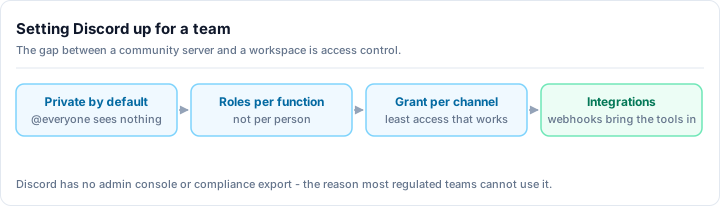
Role Hierarchy for Teams
Keep roles simple:
@Owner- server owner, full admin@Admin- trusted senior team members, can manage channels and roles@Team- all full-time employees and contractors@Contractor- limited channel access (exclude confidential channels)@Client- if you invite clients, even more limited access
Do not create 20 roles. Role proliferation is a management headache and a permissions liability.
Privacy and Permissions
- Make your server private (invite-only, no Discovery)
- Restrict @everyone to read-only on most channels
- Grant posting permissions through the @Team role
- Create separate, locked channels for sensitive topics (HR, finance, legal) with explicit allow-lists
Audit Logging
Enable Discord's audit log and check it periodically. For professional use, you want to know when channels are deleted, roles are changed, and members are added or removed.
Integrations That Work Well
Discord's webhook system is straightforward and powerful. Many business tools can push notifications to Discord without a dedicated bot.
GitHub
The official GitHub bot posts PR notifications, issue updates, and CI status to a designated channel. For engineering teams, this is genuinely useful - the entire team sees build failures and PR reviews without leaving Discord.
Setup: GitHub repository → Settings → Webhooks → add your Discord channel's webhook URL.
Linear and Jira
Both Linear and Jira support webhook-based Discord notifications. You can route issue updates, sprint changes, and deployment events to a project-specific Discord channel. This works best as a notification layer on top of your actual project management tool - Discord is not a substitute for a proper issue tracker.
Google Calendar
Zapier or Make (formerly Integromat) can connect Google Calendar to Discord, posting daily agenda summaries or event reminders to a channel. This works well for distributed teams across timezones who need a visible reminder that a standup is starting.
CI/CD Pipelines
GitHub Actions, CircleCI, and most CI tools support Discord webhook notifications natively. Route deployment success/failure notifications to a #deployments channel. This gives the whole team visibility into production changes without anyone needing to watch a dashboard.
Use webhooks, not bots, for notifications
For one-way notifications (GitHub, CI/CD, calendar), webhooks are simpler than bots. You don't need OAuth, you don't manage bot permissions, and they're harder to accidentally break. Reserve bots for interactive features that require two-way communication.
Discord Nitro for Business Context
Discord's paid tiers are personal subscriptions, not business plans. Here's what actually matters for professional use:
Server Boosts: Boost your server to Level 1 (2 boosts, ~$10/month total) to unlock 128kbps audio quality and 720p 60fps screen sharing. Level 2 (7 boosts) adds 1080p 60fps video and 50MB file uploads. For a team doing frequent screen sharing sessions, the video quality improvement is noticeable.
Nitro for individuals: Individual Nitro subscriptions give larger file uploads (500MB with Nitro) and animated avatars. There is no business discount or enterprise billing - you pay per individual subscription.
Discord does not offer business invoicing, centralized billing, or team-level subscriptions. This is a genuine limitation for businesses that need to expense tools through accounting.
Head-to-Head: Discord vs. Slack vs. Teams
| Discord | Slack | Microsoft Teams | |
|---|---|---|---|
| Base cost | Free | $7.25/user/month (Pro) | Included in M365 |
| Message history | Unlimited (free) | 90 days (free) | Unlimited |
| Voice quality | Excellent | Good | Good |
| Screen sharing | Free | Paid plans | Included |
| SSO/SAML | No | Yes (paid) | Yes |
| HIPAA compliance | No | Yes (Business+) | Yes |
| Message retention | No | Yes (paid) | Yes |
| File storage | 25MB free | 5GB/workspace (free) | 10GB + 1TB OneDrive |
| Enterprise admin | Minimal | Full | Full |
| Bot ecosystem | Excellent | Good | Moderate |
| Ambient voice | Excellent | No | No |
| API quality | Excellent | Good | Adequate |
Discord wins on: Cost, voice, bot ecosystem, community feel, API developer experience.
Slack wins on: Enterprise features, threading at scale, SaaS integrations, professional perception.
Teams wins on: Microsoft 365 integration, cost if you already pay for M365, enterprise governance.
Who Should and Shouldn't Use Discord for Business
Good fit for Discord:
- Early-stage startups under 20 people, especially in tech, gaming, or creative fields
- Remote-first teams where informal communication and ambient voice matter
- Teams that also run an external community and want one place for both
- Developer-led companies that value a strong bot and webhook ecosystem
- Bootstrapped businesses where tool cost is a genuine constraint
Poor fit for Discord:
- Any team with HIPAA, SOC 2, or other compliance requirements
- Teams over 50 where role management and onboarding complexity grows
- Enterprise environments with IT governance requirements (SSO, device management)
- Client-facing agencies where "join our Discord" will undermine professional perception
- Teams that need structured project management - Discord is not a PM tool
The honest answer is that Discord works well for a specific slice of teams and poorly for everyone else. If you're in the right slice, you'll find it surprisingly capable. If you're not, you'll spend weeks fighting limitations that Slack or Teams solved years ago.
For setting up your Discord server professionally, see our Discord server setup checklist for the complete configuration guide, and our Discord server moderation guide for keeping team channels clean and productive.