Some messages have to be read. The format for a showcase channel, the one rule that keeps a support channel usable, the link people ask for every single day. You post it, and by the afternoon it is four hundred messages up.
Pinning is the obvious answer and it does not work, because a pin lives behind an icon in the corner that most members never click. What you want is a message that stays at the bottom, where everyone is already looking.
That is a sticky message, and Discord has no native version of it. This guide covers what a good sticky system needs, which bots do it, and how to write one that people actually read.
What a sticky message is, and why pins do not do the job
A sticky message is one a bot keeps at the bottom of a channel. When the channel moves, the bot deletes its previous copy and posts the message again, so the notice is always the last thing on screen rather than wherever it happened to land an hour ago. Discord ships no equivalent. Pinning is the closest built-in feature and it solves a different problem: pins are an archive, reachable through an icon in the corner, and reading them is something a member has to choose to do. A sticky is not opt-in. It sits in the conversation, in the position everyone is already looking at, which is exactly why it works for the one thing you need read before someone posts. The distinction is worth being deliberate about - use pins for reference material, and a sticky for the single message that has to land.
The one-sticky rule
One sticky per channel, one idea per sticky. A sticky is permanently visible, and that is precisely what makes a long one feel like clutter by the second day. If it needs paragraphs, put those in a pinned message and let the sticky point at it.
What a good sticky system needs
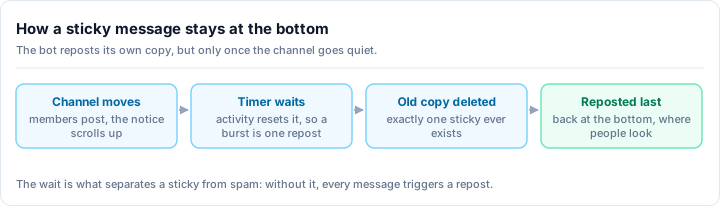
The mechanic sounds trivial - delete the old copy, post a new one - and almost everything that separates a usable sticky bot from an irritating one is in how it handles a busy channel. A naive implementation reposts on every single message, which turns an active channel into a wall of the same notice and burns through rate limits until the bot stops responding. A good one waits for a short quiet period after a burst of conversation and reposts once, then does nothing at all while the channel is idle. It must also delete its previous copy rather than leaving a trail, survive a moderator deleting that copy by hand, and never repost when its message is already the newest thing in the channel. None of this is visible when it works, and all of it is obvious the moment it does not.
- Debounced reposting. Activity should reset a short timer, so a burst of fifty messages produces one repost rather than fifty.
- Exactly one copy. The bot deletes its previous message before posting the new one. A sticky bot that leaves old copies behind is worse than no sticky at all.
- Idle means silent. If nothing has scrolled the message away, there is nothing to do. A quiet channel should cost nothing.
- Survives interference. Moderators purge channels. If the previous copy is already gone, the bot should carry on rather than getting stuck.
- Per-channel configuration. Different channels need different notices, and one channel should never inherit another's.
- Editable without re-creating. Changing the text should update the sticky, not require deleting and setting it up again.
The bots that do this
Sticky messages are a long-standing staple rather than a novelty, and the established names are worth knowing.
Carl-bot and Dyno both offer sticky messages and are widely used for it. Both are mature, general-purpose bots with large installed bases, and if you already run one of them for moderation you may already have this capability sitting unused.
The question worth asking is not which sticky implementation is best - they all keep one message at the bottom of a channel - but whether the feature is worth a whole extra bot. Every additional bot is another set of permissions to reason about, another dashboard, and another thing to check when something breaks.
Rally Bot - sticky messages, without a second bot
Rally Bot includes sticky messages in a free all-in-one, so a notice that stays put does not cost you a separate install.
- One sticky per channel, configured from the same web dashboard as everything else.
- Debounced reposting - it waits for the channel to go quiet rather than reposting on every message, and skips entirely when its copy is already the newest thing there.
- Single copy, always. The previous message is deleted before the new one posts, and a copy a moderator already purged is handled rather than getting the bot stuck.
- Edit or disable in place without tearing the sticky down and rebuilding it.
- Free, with no premium tier - the same as the moderation, leveling, roles, tickets and giveaway features beside it.
Rally Bot sticky strengths
- Sticky messages free, in the same bot as moderation, leveling, roles, tickets and giveaways
- Debounced so a busy channel gets one repost, not one per message
- Costs nothing while a channel is idle
- Configured from a web dashboard rather than slash-command syntax
- One dashboard for the sticky and the rest of your server
Honest limitations
- Plain text only - no embed-formatted stickies yet
- Configured on the web, so there is no in-channel command to set one on the fly
- Newer than the established specialists, so less name recognition
Add Rally Bot to your server - free, no credit card, no locked features.
Discord sticky message bots compared
| Feature | Rally Bot (Free) | Carl-bot | Dyno |
|---|---|---|---|
| Sticky messages | ✅ | ✅ | ✅ |
| One sticky per channel | ✅ | ✅ | ✅ |
| Web dashboard configuration | ✅ | ✅ | ✅ |
| Bundled with full moderation | ✅ | ✅ | ✅ |
| Leveling, economy, tickets in the same bot | ✅ | Partial | Partial |
| Premium tier required for depth | ❌ None | Some features | Some features |
The pattern: all three keep a message at the bottom of a channel, and the real decision is how many bots you want running. If you already have Carl-bot or Dyno configured and happy, use what you have. If you are choosing now, a sticky is a small enough feature that it should not be the thing that decides your bot.
How to write a sticky people actually read
Pick the one thing
A sticky is permanently visible, so it can carry exactly one idea before it becomes wallpaper. The channel's format rule, the link, or the live-event notice - not all three.
Write it short enough to read at a glance
Two lines is plenty. If a member has to stop and read a paragraph before posting, most of them will just post.
Say what to do, not what not to do
"Post your work with a short description of the tools you used" lands better than a list of prohibitions, and it tells someone how to succeed rather than how to fail.
Revisit it when the channel changes
A sticky written for a launch is stale a month later, and a stale sticky teaches people to ignore stickies. Check them when the channel's purpose shifts.
So which sticky message bot should you pick?
If you already run Carl-bot or Dyno and have them configured the way you like, use the sticky feature you are already paying for in setup cost.
If you are setting up a server now, or you are tired of running four bots to get five features, Rally Bot puts sticky messages in the same free all-in-one as your moderation, leveling, roles, tickets and giveaways - one dashboard, no premium tier.
Whichever you pick, the sticky itself matters more than the bot behind it. One idea, two lines, phrased as what to do. That is the difference between a notice people read and a notice people learn to scroll past.
Setting up a new server? Browse active community servers on Rally to see how established communities structure their channels.