"Verified server" gets thrown around loosely in Discord communities, but the actual Discord verification badge has specific meaning and a specific application process. Understanding what verification actually is - and how it differs from other server designations - is the first step to knowing whether it's something your server can realistically pursue.
This guide covers the verified badge program accurately: what it is, who qualifies, how to apply, and what alternatives exist for servers that don't meet the bar.
Two Different Things Called "Verified"
There's genuine confusion in the Discord ecosystem about this, so let's clear it up first. The Discord Verified Badge is a blue checkmark that appears next to a server name on public listings and invite links, awarded by Discord to notable organizations, brands, and public figures like major game studios, music artists, sports teams, and tech companies to confirm identity. Community Servers, by contrast, are a completely separate designation that any server owner can enable in Server Settings - this unlocks features like Server Discovery, Welcome Screen, and Onboarding, but carries no badge and isn't awarded by Discord. Many guides conflate these two things, but they are fundamentally different. Verification is purely a trust and authenticity signal for established entities, while Community mode is about features available to all servers. Understanding this distinction is essential before pursuing either path, since most servers should focus on Community mode rather than the Verified badge, which is realistically out of reach for servers without significant public presence.
Discord Verified Badge - A blue checkmark that appears next to a server name on public listings and invite links. Discord awards this to notable organizations, brands, and public figures: major game studios, music artists, sports teams, TV shows, tech companies, and similar entities. It confirms identity - "this is the official server for X." It's analogous to the verified checkmark on social media platforms.
Community Servers - A completely separate designation. Any server owner can enable Community mode in Server Settings. It unlocks features (Server Discovery, Welcome Screen, Onboarding, Insights) but is not awarded by Discord and carries no badge. Community is about features, not identity verification.
Many guides conflate these two things. They are not the same. The rest of this guide focuses on the actual Verified badge program.
Most servers should focus on Community, not Verified
The Verified badge is realistically out of reach for most servers - it's designed for organizations with significant public presence. If you're building a community server, enabling Community mode and optimizing your server for discovery is far more impactful than pursuing Verified status.
What Verification Actually Gives You
A Verified server gets:
- A blue checkmark badge displayed next to the server name in invite links, discovery, and public listings
- The official status signal that this is the genuine server for the entity it represents (not an impersonator)
- Increased trust from members and potential members
What it does not give you: extra Nitro boost levels, audio quality improvements, emoji slots, or any technical feature upgrades. Those come from boosts, not verification. Verification is purely a trust and authenticity signal.
The Discord Partner Program (Different from Verified)
Before applying to anything, understand that Discord runs two separate programs:
Discord Verified - For organizations, brands, and public figures. Identity-focused. The blue checkmark.
Discord Partners - For exceptional community servers. Quality and culture-focused. The purple partner icon. Partners get perks like a custom invite URL (discord.gg/yourbrand), additional emoji slots, a partner profile, and the partner badge.
If you run a community server (gaming, art, hobby, etc.) rather than representing a brand or organization, the Partner Program is the more relevant target. It still has high standards - active, engaged community, positive culture, original content - but it's designed for communities rather than brands.
Applications for both programs go through Discord's official application page.
Eligibility for the Verified Badge
Discord hasn't published an exact checklist, but based on the program's design and public precedent, Verified servers typically represent:
- Game developers and studios - Official servers for games with active player bases
- Music artists - Signed artists or independent artists with significant streaming numbers
- Content creators - YouTubers, streamers, and influencers with substantial followings (typically 100k+)
- Brands and companies - Tech companies, media companies, entertainment studios
- Sports teams and organizations - Professional and semi-professional teams
- TV shows, movies, and media properties - Official servers for entertainment properties
What these have in common: an established public presence elsewhere (official website, significant social media following, press coverage) and the server directly represents the entity named.
Servers that typically don't qualify: Community servers organized around a topic or interest without a specific organization behind them, personal hobby servers, fan servers (unofficial servers are almost never verified), new servers without an established track record.
How to Apply
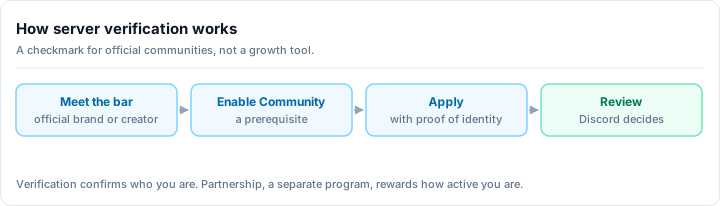
Verify your server qualifies at a basic level
Before applying, confirm:
- Your server has Community mode enabled
- Your server represents a real organization or public figure
- That organization has a meaningful public presence (official website, social media, press coverage)
- The server is genuinely the official server, not a fan server
Prepare your documentation
Discord's application asks you to demonstrate your organization's legitimacy. Gather:
- Your official website URL
- Social media profile links (Twitter/X, Instagram, YouTube, etc.) with follower counts
- Press coverage links (news articles, reviews, features)
- Any other evidence of your public presence and reach
Submit through Discord's official page
Go to discord.com and navigate to the Partner / Verification application page (search "Discord verified server application" for the current direct link - Discord occasionally updates their submission flow). Fill in the application truthfully and completely.
Wait for review
Discord reviews applications manually. Expect several weeks before hearing back. During this time, continue growing and improving your server. There's nothing you can do to expedite the review.
Respond to any follow-up requests
Discord may email you requesting additional information or clarification. Respond promptly and completely. Slow responses can delay or complicate your application.
Common Rejection Reasons
Insufficient public presence. The organization exists but doesn't have the size or prominence Discord's program targets. Build your social media following, get press coverage, and reapply when your numbers are stronger.
Fan server rather than official server. Discord doesn't verify fan-run servers, even large, well-run ones. Only the official server operated by or in partnership with the entity itself qualifies.
Server too new or too small. Even if the organization qualifies, a server with 200 members that was created last month has less credibility than one with 10,000 active members and a year of history.
Incomplete application. Missing information, broken links, or vague descriptions lead to rejections. Treat the application seriously - it's your pitch.
Rejection is not permanent
Most programs allow reapplication after 30 days. Use the rejection feedback to address specific gaps and reapply with a stronger application.
What to Do If Verification Isn't for You
For the vast majority of community servers, verification isn't a realistic goal - and that's fine. Here's what actually drives growth and legitimacy for community servers:
Enable Community mode
Server Settings → Community → Enable Community. This unlocks:
- Server Discovery - Appear in Discord's built-in server search (requires 1,000 members and meeting quality criteria)
- Welcome Screen - Greet new members and direct them to key channels
- Onboarding - Personalize the new member experience with interest questions and role assignment
- Server Insights - Analytics on member activity, retention, and growth
This is free, available to all servers, and has a direct impact on discoverability and member experience.
List your server on discovery platforms
Discovery platforms let people actively searching for communities find yours. Optimize your server listing with a compelling description, accurate tags, and a professional icon. Active servers with good descriptions consistently attract new members through discovery.
Browse what gaming communities, social servers, and other categories look like on discovery platforms to understand what makes a listing stand out.
Focus on quality over status
A server with 500 engaged, active members and no badges is more valuable than a verified server with 10,000 ghosts. Invest in the member experience - events, content, moderation, culture - and growth follows.
Next Steps
Whether you're pursuing verification or focusing on organic growth, these guides help:
- How to grow your Discord server - systematic strategies for building an active community
- Discord server setup guide - the foundation verification reviewers and members both evaluate
- Discord server moderation guide - quality moderation is a requirement for any serious verification application
The verified badge is meaningful, but it's a recognition of what a server already is - not a shortcut to becoming something. Build a genuinely great community, and recognition of various kinds follows naturally.