Polls are one of the fastest ways to drive engagement in a Discord server. A good poll gets members who lurk to participate, generates conversation in the replies, and gives you real data about what your community thinks or wants.
Here's the good news: you do not need a bot to run a poll anymore. Discord added native polls in 2024, and they have improved meaningfully since launch. For most day-to-day votes they are the fastest, cleanest option. They do still have limits - no anonymity, a 7-day cap, no scheduling, no recurring polls - and that is where a bot earns its place. This guide covers both approaches clearly so you can pick the right tool for each situation.
Discord's Native Poll Feature
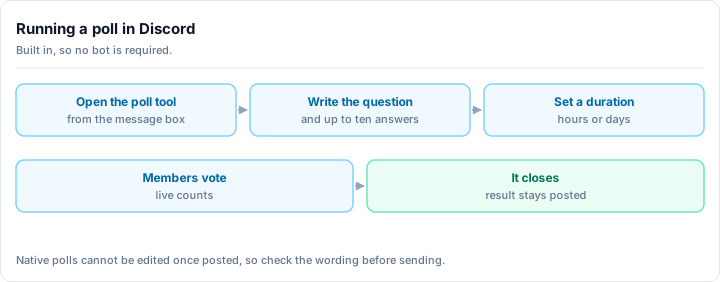
To create a poll in Discord, type /poll in any text channel where you have permission to send messages. Discord's poll builder opens as a form: enter your question, add up to 10 answer options, choose a duration between 1 hour and 7 days, and decide whether members may select more than one answer. Click Send and the poll posts immediately as a formatted card. Members vote by clicking an option, and the vote distribution updates live for everyone in the channel. No bot is required, and the feature works identically on desktop, web and mobile. Discord shipped native polls in 2024, so any server on a current client already has this. The poll creator, and anyone holding the Manage Messages permission, can end a poll early from the card's own menu, which closes voting and freezes the final result in place.
Creating a native poll
Type /poll in a channel
In any channel where you have Send Messages permission, type /poll. Discord's built-in poll command appears in the slash command menu. Select it.
Write your question
The first field is your poll question. Be specific and clear. Vague questions produce vague results. "Which topic should we cover in next week's event?" gets better data than "What do you think?"
Add your answer options
You can add up to 10 options. Click the option fields and fill them in. Each option can include an emoji, which makes the poll more visually distinct and easier to scan. You need at least 2 options; the rest are optional.
Set the duration
Choose how long the poll runs: 1 hour, 4 hours, 8 hours, 1 day, 3 days, or 7 days. Pick based on when you need the results and how much time your community needs to see the poll. Community announcements work well with 24-48 hours; quick decisions can use a few hours.
Allow multiple answers (optional)
Toggle the multiple answers option if you want members to select more than one option. Good for "pick all that apply" questions; keep it off for "pick your favorite" or single-choice decisions.
Send the poll
Click Send (or Enter). The poll posts immediately as a formatted card. Members click options to vote; results update live as votes come in.
Where you can post a native poll
Native polls work in any text channel, in threads, and inside Forum Channel posts, which is the combination most guides miss. Posting one inside a forum post is the cleanest way to run a vote attached to a specific proposal without cluttering a main channel.
What native polls do well
- Zero setup - No bot required. Works everywhere Discord does, including mobile.
- Clean design - The poll card looks professional and is easy to understand at a glance.
- Real-time results - Members see the current vote distribution update live.
- Integrated with Discord - No external link, no leaving the app.
- Manageable - You can end polls early. Server mods with Manage Messages can also do so.
For a quick "which day works for game night?" or "pizza or tacos?" vote, native polls are the right answer. Reach for a bot only when you bump into one of the limits below.
The limitations you need to know
Polls are not anonymous. Any member can click the vote count to see who voted for each option. For most polls this doesn't matter, but for sensitive topics (staff feedback, community governance decisions, honest opinions), anonymous voting matters a lot. Native polls don't offer it.
Maximum 7-day duration. You cannot run a poll longer than a week. For longer-running community decisions or ongoing feedback collection, you need a bot.
No scheduling. Native polls post immediately. You can't write one now and schedule it to appear at a specific time.
No recurring polls. Running the same weekly poll (e.g., "What are you playing this weekend?") requires creating it manually each time.
Limited to 10 options. Most polls don't need more, but some community surveys do.
Pin important polls
Right-click any poll and pin it to prevent it from getting buried in channel scroll. Important polls (server decisions, event selection) deserve to stay visible for their full duration.
When You Need More Than Native Polls
You need a poll bot when you hit one of four native limits: anonymity, duration, scheduling, or restricting who may vote. Discord's built-in polls are public by design, so any member can open the results and see exactly who chose what. They cap at 7 days, cannot be scheduled in advance, cannot repeat on a cycle, and cannot be limited to a particular role. For a quick vote on game night these limits never come up. For staff feedback, community governance, a season-long decision, or a standing weekly check-in, every one of them does. This is the point where server owners historically bolted a single-purpose poll bot onto whatever else they were already running, and then maintained two separate dashboards just to run one community.
A bot becomes worth it the moment you need any of these:
- Anonymous voting - so members answer honestly without their name attached.
- Polls that outlast 7 days - ongoing decisions, season-long votes, standing feedback boxes.
- Scheduled and recurring polls - write a weekly poll once and let it repost on its own.
- Role-restricted voting - limit a governance vote to verified or trusted members.
- Polls wired into the rest of your community - votes that connect to your roles, channels, and engagement systems rather than sitting on their own.
The old way to get these was to add a single-purpose poll bot. The problem is that every extra bot you add brings its own dashboard, its own set of role and channel permissions to audit, and its own way of breaking. Each one also widens what a compromised token can reach, which is why moderation teams increasingly consolidate. In 2026 the cleaner move is one capable all-in-one bot that includes polls and handles everything else too.
Rally Bot - Richer Polls in an All-in-One
Rally Bot is a complete server-management and community platform in a single install, configured entirely from one clean web dashboard. Polls are one feature among many - they live in the same place as your moderation, leveling, roles, and welcome flow, so you set up a community poll without bolting on a separate bot just to vote.
That is the real advantage of running polls inside an all-in-one. The vote isn't an island. It sits next to:
- Moderation and automod - keep the conversation around a heated poll civil.
- Leveling and economy - reward the members who actually show up and participate.
- Reaction and auto roles - hand out the roles a governance vote decides on.
- Welcome and goodbye, starboard, suggestions, music, and more - the everyday community toolkit, all built in.
And one thing no single-purpose poll bot offers: installing Rally Bot lists your server on Rally's discovery platform, where communities are ranked by real activity, so an active, well-run server keeps surfacing to new members.
Free, and it stays free
Rally Bot has no premium tier and no feature gating. Rally earns through discovery - server boosts and featured placements - not by charging for bot features, so polls, leveling, moderation, and the rest stay free for every server.
Add Rally Bot to your server - free, no credit card, no locked features.
If you only ever need a quick yes/no vote, you genuinely don't need any of this - Discord's native poll is perfect. The case for Rally Bot is when polling is part of a larger, active community you are already running, and you'd rather manage one bot than five. For the full picture of what one all-in-one bot replaces, see our guide to the best Discord bots in 2026.
Choosing Between Native Polls and a Bot
The decision is usually straightforward:
| Need | Native Polls | All-in-One Bot |
|---|---|---|
| Quick community vote | Yes | Works, but overkill on its own |
| Anonymous voting | No | Yes |
| Longer than 7 days | No | Yes |
| Scheduled or recurring polls | No | Yes |
| More than 10 options | No | Yes |
| Role-restricted voting | No | Yes |
| Polls tied to roles, XP, and the rest of your server | No | Yes |
For most day-to-day polls - event planning, weekend topics, feature preferences - native polls are faster and simpler. For governance, feedback surveys, anonymous votes, recurring rituals, or anything you want connected to the rest of your community, a bot is the right call. And since you are adding a bot anyway, an all-in-one means you don't add a second one later.
Best Practices for Poll Engagement
Ask questions that actually need answering
Polls are engagement tools, but the best polls are ones where the result genuinely influences a decision. "What game should we play Friday?" is a real question. "Do you like this server?" is not - it's a vanity check. Members can tell the difference. Polls that drive real decisions get taken seriously; polls that feel performative get ignored.
Give the poll enough time
A poll that closes in two hours misses members in different timezones, members who check Discord once a day, and members who see the poll after the fact. For decisions that affect the whole community, run polls for at least 24-48 hours. Important decisions (rule changes, event formats, major server changes) deserve 3-7 days.
Post in the right channel
Don't bury polls in busy chat channels where they scroll off screen within hours. Use a dedicated #polls channel or post in #announcements for important votes. Then reference the poll in general chat so members know to go vote.
Cross-post poll reminders
A day before an important poll closes, post a quick reminder in your general chat with a link to the poll channel. A nudge like this reliably lifts final vote counts.
Discuss the results
A poll without follow-up is a dead end. After the poll closes, post the result and explain what you're doing with it: "The community voted for X, so we're doing X on Friday." This closes the loop, shows members their vote mattered, and builds trust that future polls are worth participating in.
Don't poll everything
If you run polls constantly, members develop poll fatigue and stop voting. Reserve polls for decisions where the community's input genuinely shapes the outcome. Use your own judgment for operational decisions that don't need community input. The scarcity of polls makes each one feel meaningful.
Using Polls for Specific Goals
Event planning - "Which day works for the next community game night?" Use a native poll, 48-hour duration, single choice.
Content or topic selection - "What topic should we cover in next month's guide?" Use a native poll, 3-day duration.
Feedback collection - "How would you rate the event?" Use a bot with anonymous mode. Members give more honest feedback when their name isn't attached.
Server governance - "Should we add a new rule about X?" Use a bot, 7-day window, anonymous, restricted to verified members only.
Running engagement - Weekly "What are you playing this weekend?" or "Show your work" polls. Use a bot's recurring feature to automate posting. These become community rituals over time, and they land harder when they sit next to leveling and rewards that recognize the regulars.
Next Steps
Polls are one piece of a broader community engagement strategy:
- 15 Discord engagement tips - more ways to keep your community active and participating
- 25 Discord event ideas - events worth polling your community about
- How to grow your Discord server - building the community that makes polls meaningful
A well-timed poll in the right channel with a clear, actionable question is one of the simplest things you can do to remind members that their voice shapes the community. Use native polls for the quick votes, reach for a bot when you need more, and follow through on results either way.
Want polls and the rest of your community toolkit in one place? Add Rally Bot to your server - free, one dashboard, no premium tier. Then explore active gaming communities, tech communities, and anime servers on Rally to see what a well-run community looks like.