With over 500 million registered Discord accounts and millions of active servers, finding the right community can feel overwhelming. Whether you're looking for gaming servers, study groups, hobby communities, or just a place to hang out, there are multiple reliable ways to discover exactly what you're after.
This guide covers the 7 best methods to find Discord servers in 2026, from beginner-friendly to power-user techniques.
1. Use a Discord Server Discovery Site
The fastest way to find Discord servers is through a dedicated server directory. These platforms let you search by topic, filter by member count, and browse curated lists of active communities. Directory sites maintain large databases of servers across gaming, art, programming, study, music, and other interests, making it simple to narrow down options that match what you're looking for. You can typically browse by category, search for specific keywords, and see activity indicators that show whether a server is thriving or inactive before you join. This approach saves time compared to searching randomly, since the directories have already aggregated thousands of communities in one place. Whether you're new to Discord or looking to expand your communities, a server directory is the most straightforward entry point to discovering the right fit for your interests.
Best Discord server discovery sites:
- Rally - Browse by tag, discover active communities with real engagement signals, and find servers that match your interests across gaming, art, programming, and more
- Disboard - One of the oldest directories; large database but many listings are inactive
- Top.gg - Strong for bot-focused servers and developer communities
- Discord.me - Clean SFW-focused directory with paid and free listing tiers
How to use Rally to find servers:
- Go to Rally's server discovery
- Browse by category or search for a specific topic
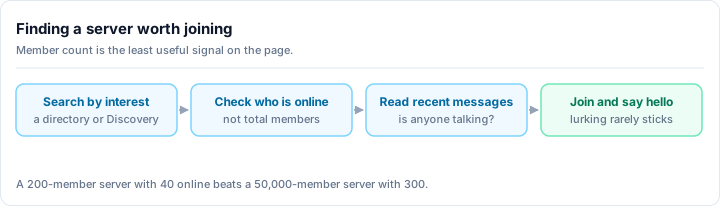
- Filter by activity level to find servers that are actually alive
- Click "Join" on any server that looks interesting
Rally shows activity tier indicators - so you can tell immediately whether a server is very active, growing, or quiet before you join.
2. Search Reddit
Reddit is one of the most underrated places to find Discord servers. Many subreddits have dedicated threads or sidebars with invite links to Discord communities related to that topic.
Where to look:
- r/discordservers - Dedicated subreddit for server promotion with category flair filters
- r/discord - General Discord community with regular server sharing threads
- Topic-specific subreddits - Search "discord" in any subreddit's sidebar or use the search function:
site:reddit.com discord.gg [your topic]
Pro tip: The site:reddit.com discord.gg anime style Google search finds Reddit threads where people shared invite links for specific topics. This often surfaces servers that aren't listed on any directory.
3. Use Discord's Built-In Server Discovery
Discord has a native discovery feature built directly into the app - no third-party site needed.
How to access it:
- Open Discord (desktop or mobile)
- Click the compass icon in the left sidebar (or look for "Explore Public Servers")
- Browse by category or search by keyword
Limitations: Discord's built-in discovery only shows servers that have been verified or have reached a minimum member threshold (~1,000 members). Smaller but potentially great communities won't appear here. For broader discovery, third-party directories like Rally show servers of all sizes.
4. Follow Invite Links from Your Communities
Discord servers frequently link to related servers. Once you're in one community, you'll often find:
- Partner servers listed in a
#partnersor#affiliateschannel - Invite links shared in announcements for related communities
- Cross-promotion in event channels or specific interest threads
This "web of invites" is how experienced Discord users discover their best communities - one great server often leads to another.
5. Search Twitter/X and YouTube
Content creators frequently share their Discord server invite links on social media and YouTube:
- Twitter/X: Search
discord.gg [topic]orjoin my discord [topic]for recent posts with invites - YouTube: Check video descriptions for Discord invite links - gaming, study, art, and programming creators almost always have their own servers
- Twitch: Every Twitch streamer has a Discord server; look in their channel panel or !discord command
Example YouTube search: "best minecraft community discord" - Most top results will have Discord invite links in their descriptions.
6. Ask in Existing Discord Servers
Already in a Discord server for one hobby? Ask for recommendations in that community. Members of niche Discord communities almost always know other communities worth joining.
Try asking:
- "Does anyone know good Discord servers for [related topic]?"
- "What other servers do people here recommend?"
- Post in a
#recommendationsor#off-topicchannel if available
Community members give better-quality recommendations than any directory because they've already vetted the servers through personal experience.
7. Google Search for Discord Servers by Topic
Direct Google searches are highly effective for finding Discord servers around specific topics:
Search queries that work:
"discord server" [your topic]- General server search"discord.gg" [your topic]- Finds pages that include invite linksbest [topic] discord servers 2026- Finding curated "best of" lists[game name] discord server- Game-specific community search
Rally's blog covers curated lists for many specific interests:
- Best gaming Discord servers
- Best anime Discord servers
- Best programming Discord servers
- Best study Discord servers
- Best music Discord servers
Tips for Evaluating a Discord Server Before You Join
Not every server you find will be worth your time. Before committing, look for these quality signals:
Green flags:
- Recent messages in visible channels (active servers are alive)
- Clear channel organization with topic-specific channels
- Active moderation (rules enforced, spam removed)
- Community-specific events or bots that encourage interaction
Red flags:
- Last message was days or weeks ago (ghost server)
- Only promotional or bot channels
- Overwhelming DM spam immediately after joining
- No visible moderation presence
How to Find Servers for Specific Topics
Here are quick-start links to find Discord servers by category on Rally:
- 🎮 Gaming servers - FPS, RPG, strategy, and more
- 🎨 Art servers - Drawing, digital art, and creative communities
- 💻 Programming servers - Coding help, language-specific communities
- 📚 Study servers - Accountability groups and academic help
- 🎵 Music servers - Production, listening, and genre-specific communities
- 🌟 Anime servers - Discussion, recommendations, and fan communities
- ₿ Crypto servers - Trading, DeFi, and blockchain discussion
Frequently Asked Questions
How do I find a Discord server for a specific game?
Search the game name on Rally or Google [game name] discord server. Most major games have multiple active communities at various skill levels.
Are there Discord servers for beginners?
Yes - search for "beginners" or "newcomers" tags on any Discord directory, or look for servers with dedicated #welcome and #introductions channels.
How do I know if a Discord server is safe? Look for servers with clear rules, active moderators, and visible moderation logs. Verified servers on Discord's native discovery have met minimum safety requirements.
Can I find Discord servers in my language?
Absolutely. On Rally, servers often include language in their description. You can also filter by searching [language] discord server or browsing Disboard's language filter.
What's the best Discord server discovery site? Rally offers the most accurate activity signals and modern interface. Disboard has the largest database. Top.gg is best for developer/bot communities. See our full comparison of Discord server list sites.
Ready to start exploring? Browse Rally's server discovery to find active Discord communities across every interest - gaming, art, study, programming, and thousands more.