The moment someone joins your Discord server, they're deciding whether to stay. The first thing they see - usually your welcome message - determines whether they feel welcomed or overwhelmed.
A thoughtful welcome message reduces early dropout. Members who interact in their first 24 hours are much more likely to stick around long-term, and your welcome message is the catalyst for that first interaction.
This guide covers what a great welcome message says, the variables and tone that make it land, and how to set the whole system up for free.
Why Your Welcome Message Matters
New members face immediate decision fatigue when they join your Discord server. They're asking themselves critical questions: What channels can I access? What are the rules here? Where do I introduce myself? Is this actually the right community for me? A thoughtful welcome message answers all of these questions at once and makes the member feel valued rather than lost. Without a good welcome message - or with no message at all - new members feel confused and are likely to leave within minutes. The stakes are high because members who interact in their first 24 hours are much more likely to stick around long-term, and your welcome message is the catalyst for that first interaction. By reducing early dropout through a clear, personalized greeting, you transform that critical first moment into an opportunity to build genuine connection and community belonging.
A good welcome message answers all of these and makes the member feel valued. A bad one - or no message at all - leaves them confused and likely to leave within minutes.
Understanding Discord's Welcome Options
You have three layers to work with. The best servers combine them rather than picking one.
1. Discord's Built-In Welcome Screen
Discord's native Welcome Screen appears as a modal the first time a member opens your server.
Enable it: Server Settings → Community → Welcome Screen
What you can do:
- Add a brief server description
- Highlight up to 5 channels with custom descriptions
- Point members to the channels they should explore first
Pros: built in, free, no bot needed, and it forces attention before anyone can chat.
Cons: the content is static and identical for everyone, there's no personalization, and you can't tell whether members actually read it.
2. Discord's Onboarding Feature
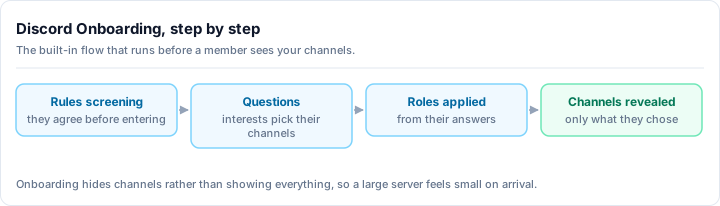
If your server has Community features enabled, Onboarding (Server Settings → Community → Onboarding) lets you ask new members a few questions, show channels based on their answers, and assign starter roles. It's free and Discord-native.
It's genuinely useful, but it's a guided menu, not a greeting. It can't post a personalized message, render a custom image, or send a goodbye when someone leaves.
3. Bot-Powered Welcome Messages (Recommended)
This is where the real personalization lives, and it's the layer Discord's native tools can't replace. A bot does what the Welcome Screen and Onboarding can't:
- Dynamic variables - member name, server name, live member count
- Rich embeds with colors, formatting, and your branding
- Custom welcome images - a banner with the member's name and avatar
- DM welcomes - a private greeting alongside the public one
- Auto-role assignment on join
- Goodbye messages when a member leaves
- Conditional content based on how they joined
The native Welcome Screen sets the scene. The bot makes each member feel personally greeted. Use both.
Setting Up Welcome Messages with Rally Bot
The cleanest way to get the full bot layer - welcome and goodbye messages, welcome images, and auto-roles - is Rally Bot. It's a free, all-in-one bot managed entirely from one web dashboard, with no premium tier and nothing locked behind a paywall. The welcome system isn't a teaser for a paid plan, it's just included.
Why this stays free
Most welcome bots reserve images or higher limits for a subscription. Rally Bot earns through server discovery - boosts and featured placements - not by paywalling features. So welcome images, goodbye messages, and auto-roles are free, and there's no business reason for that to change.
Here's the full setup:
Add Rally Bot to your server
Authorize the bot at the install page. It joins in seconds, free, with no credit card and no locked features.
Open the Welcome settings
In the Rally dashboard, select your server and open the Welcome settings. Everything below is configured here - no slash commands to memorize.
Pick your welcome channel and write the message
Choose the channel where greetings post, then write your message. Drop in variables like the member's name, your server name, and the live member count so each welcome reads as personal rather than canned.
Turn on a welcome image (optional)
Enable the welcome banner to render an image with the new member's name and avatar. A visual greeting stands out far more than plain text and signals an active, cared-for server.
Set an auto-role on join
Assign a default role automatically when someone joins - a "Member" role that unlocks channels, or an "Unverified" role you swap after they accept the rules. This is the backbone of any onboarding gate.
Add a goodbye message (optional)
Configure a goodbye message for when members leave. It keeps your logs honest and, in smaller communities, a warm send-off leaves the door open for people to return.
Test with a second account
Join with an alternate account to see exactly what a new member sees. Tweak the wording, image, and role until it feels right, then you're live.
Because Rally Bot is all-in-one, the same dashboard also handles your moderation, leveling, self-serve role panels, and other core community tools - so your welcome flow isn't a separate bot to babysit. For the full picture of what one bot can replace, see the best Discord bots in 2026, and for a focused comparison of welcome-specific options see the best Discord welcome bot guide.
Discovery comes built in
Installing Rally Bot also lists your server on Rally's discovery platform, where communities are ranked by real activity. A server with a strong welcome flow keeps members active, which keeps it surfacing to new people. No other major welcome bot connects onboarding to organic growth.
Add Rally Bot to your server - free, no credit card, no premium tier.
Every welcome bot can post a message. What varies is how much of the set you get without paying: variable text, custom images, goodbye messages, DM greetings, and auto-roles are all free in Rally Bot and live in the same dashboard as the rest of your server. If you want them lined up side by side, the welcome bot comparison does exactly that.
Crafting Your Welcome Message Content
The bot handles delivery. The words are still on you. Here's the anatomy of a welcome message that actually gets read.
The Five Parts of a Great Welcome Message
1. Greeting (personal)
Welcome to Gaming Zone,
{user}! 👋 We're glad you're here.
2. What this server is (clear)
We're a community for turn-based strategy fans - discussion, events, and tournament play.
3. Getting started (actionable)
Start by reading #rules (takes 2 minutes) and introducing yourself in #introductions.
4. Key channels (guidance)
Head to #announcements for events, #gaming-discussion for gameplay talk, and #off-topic for casual chat.
5. Call to action (warm)
Questions? Ask any mod or just say hi in #general. We're here to help!
Variables That Make It Feel Personal
A welcome message without variables reads like a flyer. With them, it reads like someone noticed you walked in. The ones worth using:
- Member name - greet the person directly, never "Welcome new user"
- Server name - reinforces where they are
- Member count - "You're our 1,200th member" makes them feel like part of something growing
- Mention - pinging the new member once draws their eye to the message
Keep it to one or two per message. Stuffing in every variable looks robotic, which is the opposite of the goal.
Match the Tone to Your Community
The same structure works for any server - the voice is what changes.
For a gaming community:
Welcome to FrostByte Gaming,
{user}! We're a crew of strategy nuts - Civ, Crusader Kings, Total War. Read #rules to get started, then jump into #general. Our next tournament is Friday at 8 PM - sign up in #events! 🎮
For a learning community:
Hey
{user}, welcome to Python Learners! We're here to grow together. Start with #rules, then #introductions and tell us your learning goals. Browse #resources for starter guides and ask anything in #questions. We're all learning here.
For a creative community:
Welcome to Pixel Artists Club,
{user}! This is where we share, critique, and level up as artists. Read #rules, post your art in #portfolios, then explore #critique-corner and #daily-challenges. Can't wait to see your work! 🎨
The Full Onboarding Flow
Great servers don't stop at a welcome message - they build an onboarding flow that guides members through their first hours.
Step 1: Welcome Message (immediate)
The bot greets the member with a server overview and clear next steps, plus an auto-role that grants baseline access.
Step 2: Rules Channel (read)
Members read your rules and confirm them - often by reacting or clicking a button to swap their starter role for full access.
- Why: this is your cultural and legal foundation
- Make it easy: 8-12 clear points, not a wall of text
- Gate it: until they confirm, they only see the rules
Step 3: Role Selection (pick)
Members choose roles based on interests, games, or notification preferences.
- Why: personalizes their experience and tells you what they care about
- How: a self-serve role panel with buttons or dropdowns
Step 4: Introduction Channel (share)
Members introduce themselves in a dedicated channel.
- Prompt: "Tell us your name, where you're from, and why you joined"
- Celebrate: a mod or the community responds warmly to every intro
Step 5: Point Them at Content (explore)
A follow-up nudges them toward discussions matching the interests they picked.
- Example: "You picked gaming - check out #strategy-talk and #lfg"
Common Welcome Message Mistakes
Mistake 1: too long. A wall of text gets ignored. Keep it under 150 words and link out for detail.
Mistake 2: no personality. "Welcome to Server" is forgettable. Inject your community's voice - warm, funny, or whatever fits.
Mistake 3: no next steps. Members read the welcome but don't know what to do. Spell it out: "Next, read #rules. Then introduce yourself in #introductions."
Mistake 4: no human touch. Pure automation feels cold. Have a real mod or owner follow up with members who introduce themselves.
Mistake 5: static forever. Refresh it quarterly. Reference current events, active games, and upcoming things to do.
Measuring Welcome Effectiveness
Track these to see whether your welcome flow is working:
- Join-to-introduction ratio - share of new members who introduce themselves within 24 hours (aim for 40%+)
- Role selection rate - share who pick interests or roles (aim for 60%+)
- 7-day retention - share who return a week after joining (aim for 50%+)
- First message timing - how long after joining they send their first message (ideally under an hour)
If the numbers are low, the flow isn't working. Audit it and iterate.
Final Checklist
Before going public, verify:
- Welcome message is 100-150 words, no walls of text
- It answers: what is this server, and what's my first step?
- The bot is configured and tested with a second account
- A welcome image is enabled if it fits your vibe
- An auto-role assigns on join
- A goodbye message is set if you want one
- Your rules channel exists and is easy to find
- Your introductions channel has a clear prompt
- Role selection is straightforward
- A human mod or the community responds to introductions
A great welcome experience dramatically improves retention. Members who feel welcomed on day one stay active for months - so make those first five minutes count.
Ready to set yours up? Add Rally Bot to your server - free, all-in-one, no premium tier, managed from a single dashboard. Then browse active gaming communities and community servers on Rally to see welcoming, well-run servers in action.