Your Discord server is worth protecting. It holds your community, your conversations, and years of relationships - and a single compromised admin account can erase all of it in minutes.
In 2026 the threats are familiar but faster: raids (mass joins that spam and trash channels), throwaway-account and bot floods, phishing aimed at staff, and full account takeovers. The good news is that most attacks are stopped by defenses you can set up in an afternoon - and many of them are built into Discord at no cost.
This guide walks the full stack, from Discord's native settings to the right free tools, and is honest about the one case where a dedicated security specialist earns its place.
The four threat categories
Before you build defenses, know what you are defending against. Discord servers face four distinct threat categories in 2026. Raids occur when coordinated users join simultaneously to spam, post offensive content, or bait moderators - thousands of communities experience them weekly, and cleanup can take hours while damaging member trust. Throwaway-account and bot floods use automation to pour in freshly created accounts that spam links, mention everyone, or escalate privileges, overwhelming human moderators in seconds through sheer volume. Phishing and scams involve attackers impersonating staff, dangling fake Nitro, or posting links that steal account tokens - a compromised staff account often becomes the first step toward a full server takeover. Finally, admin account compromise represents the nuclear scenario: if someone obtains your password or session, they can delete channels, ban the owner, and wipe data entirely, which is why two-factor authentication exists to prevent it.
Raids and member attacks. Coordinated users (often a hostile community) join at once and spam, post offensive content, or try to bait moderators. Discord hosts roughly 19 million active servers, and raids hit thousands of communities every week. One raid can take hours to clean up and damage member trust.
Throwaway-account and bot floods. Automated or freshly created accounts pour in to spam links, mention everyone, or escalate privileges. Because it is automated, volume can overwhelm human moderators in seconds.
Phishing and scams. Attackers impersonate staff, dangle fake Nitro, or post links that steal account tokens (a token is full account access). A compromised staff account is often the first step toward a server takeover.
Admin account compromise. If someone gets your password or session, they can delete channels, ban the owner, and wipe data. This is the nuclear scenario - and the one your 2FA layer exists to prevent.
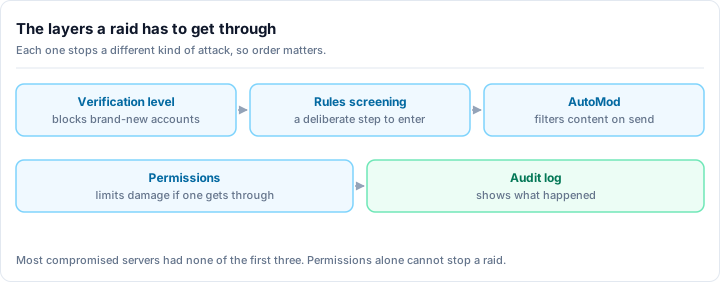
Layer 1: Native verification levels (your free foundation)
Discord's built-in verification system is your cheapest defense and blocks most casual attacks. You do not need a bot for it.
The five levels, accurately
- Level 0 (None): anyone can chat. No protection. Private friend servers only.
- Level 1 (Low): account must have a verified email. Stops the laziest throwaways.
- Level 2 (Medium): account must be registered on Discord for more than 5 minutes. A good default for most servers.
- Level 3 (High): account must be a member of your server for more than 10 minutes before chatting. The 10-minute hold stops most opportunistic raids.
- Level 4 (Highest): account must have a verified phone number. Maximum friction - it filters real members too, so reserve it for active-attack situations.
Higher is not always better
Each level up adds friction for legitimate newcomers as well as attackers. Phone verification (Level 4) in particular turns away plenty of real people. Set the lowest level that stops the attacks you actually see, and raise it temporarily during incidents.
Open Safety Setup
Go to Server Settings -> Safety Setup -> Verification Level.
Pick a level for your situation
New or small servers: Level 2 (Medium). 1,000+ members: Level 2 or 3. Active raid target: Level 3 (High) - the 10-minute hold stops most raids cold. During an active attack: Level 4 (Highest) temporarily, then drop back once it settles.
Pair it with the next layers
Verification alone is a speed bump, not a wall. Combine it with Rules Screening and AutoMod below.
Layer 2: Rules Screening (the gate before chat)
Separate from verification levels, Discord's Rules Screening (Membership Screening) makes every new member explicitly agree to your rules before they can send a message, react, or DM other members. It is available on Community-enabled servers and is one of the most effective free anti-spam tools Discord offers.
Set it up in Server Settings -> Safety Setup -> Rules Screening. Write a short, clear set of rules and require acceptance. This single step stops drive-by spammers who will not pause to click "I agree," and it gives you a clean record that every member accepted your terms.
Rules Screening is native and free - no bot required.
Layer 3: AutoMod and keyword filters
Discord's built-in AutoMod runs 24/7 with no human in the loop. Configure it in Server Settings -> AutoMod. Again, this is native and needs no bot.
- Spam and mention floods. Block messages with excessive mentions and repeated content. Action: timeout (start at 10 minutes while you tune, then extend). Catches bot floods and @everyone spam automatically.
- Links and invites. Block invite links and risky link patterns except from trusted roles. Phishing usually arrives as a link, and unsolicited invites are how raids spread.
- Keyword filter. Maintain a server-specific blocklist (slurs, harassment terms, known scam domains). Action: delete and report to a mod channel. Add new phrases as you spot them in incidents.
Start with Discord's recommended preset lists, then layer in your own terms over time. Review your mod-channel reports weekly so the filter keeps pace with new patterns.
Layer 4: A bot for anti-raid automation
Native tools are excellent at rules and patterns, but they cannot do one critical thing: react instantly to a join spike and lock the door while it is happening. That is where a bot earns its slot - it adds anti-raid newcomer screening, account-age gating, join-rate limits, and unified logging on top of what Discord gives you.
For the vast majority of servers, the right choice here is one capable all-in-one bot rather than a stack of single-purpose ones. Rally Bot is the all-in-one we recommend starting with.
Rally Bot - free, all-in-one, one dashboard
Rally Bot is a complete moderation and community platform in a single install, configured entirely from one clean web dashboard. There is no premium tier and no feature gating - the security tooling is not locked behind a paywall. For protecting a server it gives you:
- Anti-raid newcomer screening - account-age gating and verification gating that hold or reject suspicious new accounts, plus join-rate limits that automatically pause joins when they spike, so a coordinated raid hits a closed door instead of your channels.
- Moderation and automod - spam, link, and word filtering, tiered moderator roles with their own permissions, warnings, timeouts, kicks, bans, and full audit logging - all in the same place as your verification and screening settings.
Because everything lives in one dashboard, your verification posture, your filters, and your raid response are not scattered across four different bots with four different logins.
Why it is free, and why it stays free
Rally earns through server discovery, not by paywalling features. Installing Rally Bot lists your server on Rally's discovery platform, where communities are ranked by real activity rather than bump counts - so an active, well-run server keeps surfacing to genuine new members. There is no business reason to ever charge for moderation or anti-raid tools, which is exactly why they stay free.
Add Rally Bot to your server - free, no credit card, no locked security features.
If you want a deeper look at how the moderation suite compares to the classics, the best Discord moderation bot guide breaks it down feature by feature.
When you genuinely need a security specialist
Be clear-eyed about this: for most communities, an all-in-one bot's anti-raid layer plus Discord's native tools is more than enough. But a small set of servers - large, high-profile, or repeatedly targeted for nuking (mass channel deletion, mass ban, role wipes by a compromised or malicious admin) - need a dedicated anti-nuke specialist.
Anti-nuke is a narrow job: capping how many destructive actions any single account can take in a window, even an admin's, and rolling the damage back. Rally Bot covers everyday moderation, engagement, and anti-raid newcomer screening, and a dedicated anti-nuke bot can run alongside it if your server is genuinely in that bracket. The Wick alternative guide covers where each one fits.
The rule of one (with one exception)
Every extra bot multiplies permission conflicts and points of failure, so start with one all-in-one and only add a second for a real, specific gap. Dedicated anti-nuke is one of the few gaps that justifies a second bot - everything else, a complete all-in-one already covers.
Layer 5: Admin account security (the most important layer)
A compromised admin account beats every other defense. No verification level or bot stops someone who is logged in as you. Lock this down first.
Enable two-factor authentication
Go to User Settings -> My Account -> Enable Two-Factor Authentication. Use an authenticator app, not SMS where you can avoid it.
Save your recovery codes
Store the backup codes in a password manager (Bitwarden, 1Password, KeePass) - never in a plain note or a Discord message.
Require 2FA for moderator actions
In Server Settings -> Safety Setup, turn on Require 2FA for moderator actions. Now no moderator can kick, ban, or delete without 2FA on their own account. Only the owner can toggle this, and the owner must have 2FA enabled to do it.
Secure the recovery path
Your Discord account's email is the backdoor - if an attacker takes your inbox, they can reset your Discord password. Put 2FA and a unique password on that email too.
Never expose your token. A Discord token is the master key to your account. Never paste it into a website, "verifier," GitHub repo, or DM, and never click a link claiming to reveal it. If you suspect a token leak, change your password immediately (this rotates the token), then review and log out of unknown active sessions in Settings -> Active Sessions.
This layer alone blocks the large majority of account takeovers.
Layer 6: Permission hygiene and role hierarchy
Structural limits make damage harder even if an account is compromised.
- Admin role at the top of the list - owner plus one or two deeply trusted co-admins only. Never hand out Administrator casually.
- Moderator role that can delete messages, timeout, mute, and kick, but cannot delete channels or manage roles.
- Trusted/helper roles scoped to specific channels rather than server-wide power.
- @everyone stripped of dangerous permissions: Manage Channels, Manage Roles, Manage Server, Ban Members, Kick Members.
Lock down your critical channels too: in #rules and #announcements, deny Send Messages for @everyone and allow it only for staff. Keep a private #staff channel (visible to moderators and up) for incident coordination, so when chaos breaks out your team has a clean place to regroup.
The principle is least privilege: every role gets exactly the power it needs and nothing more. A hacked moderator account that cannot delete channels or ban members can only do limited harm.
Layer 7: Backup and recovery
Discord has no native "full server backup" button, so the realistic goal is to be able to rebuild fast and keep what matters off-platform.
- Save a server template. In Server Settings -> Server Template, generate a template that captures your channel structure, categories, roles, and permission overrides. Keep the link somewhere safe and regenerate it after major structural changes. It will not restore messages, but it rebuilds your skeleton in one click.
- Document your setup. Keep an off-platform note (or doc) listing your roles, permission scheme, AutoMod and verification settings, and bot configuration. If a channel structure gets nuked, this is your blueprint.
- Export what is irreplaceable. Pin and archive critical announcements, rules, and decisions somewhere outside Discord. Treat the server as the live front end, not the only copy of record.
- Keep ownership recoverable. Make sure the owner account itself is the most hardened (2FA, secured email), because ownership transfer and recovery flow through it.
With anti-nuke protection (Layer 4) limiting destructive actions and a template plus documentation ready, even a worst-case wipe becomes a few-hours rebuild instead of a permanent loss.
Layer 8: Incident response plan
Even a well-defended server can get hit. A plan turns panic into procedure.
When a raid starts:
- Lock it down. If your bot has anti-raid mode, it should auto-trigger on the join spike; if not, manually deny Send Messages for @everyone server-wide.
- Rally the team in your private #staff channel.
- Capture evidence - screenshots, usernames, join timestamps - for banning and reporting.
- Purge and ban the attacking accounts; a moderation bot can mass-action this far faster than by hand.
After it settles:
- Ban all raid accounts and report the most severe (threats, targeted hate) to Discord at discord.com/safety with your server ID, the timeframe, and screenshots.
- Review logs - did AutoMod catch it? Did anti-raid screening hold? Note what failed.
- Post a short, calm note to your community: "We had a security incident, the attackers are removed, and we are tightening our setup."
- Raise verification for 48 hours, then decide whether to keep it higher.
- Debrief with staff and update this plan based on what you learned.
The catch with all of this is timing: you cannot install anti-raid defenses mid-raid - they have to be running before the spike hits. Add Rally Bot to your server while things are calm, and the anti-raid newcomer screening is already in place when you need it.
Staff training and community culture
Your last and best layer is human. Tooling stops volume; trained people stop the clever stuff.
Teach your moderators to recognize raid indicators (clusters of new accounts, identical messages), to spot phishing ("click here to verify," fake Nitro, "free boosts"), and to never grant admin to anyone they have not genuinely vetted. Then arm your members with a pinned safety note in #rules:
Stay safe here
- Staff will never DM you asking for your password, token, or a "verification" link.
- Do not click links from accounts you do not know.
- Report anything suspicious to @mods.
- Never share your Discord token - it is the keys to your account.
A community that knows attacks are possible is far harder to scam.
Ongoing monitoring
Security is a habit, not a one-time setup.
- Weekly: check Settings -> Active Sessions and log out anything you do not recognize; skim your mod-channel reports for new patterns.
- Monthly: review and update AutoMod keywords and your bot's anti-raid thresholds.
- Quarterly: audit admin and moderator accounts - remove the inactive ones, re-check role permissions, regenerate your server template.
There is also a quieter security benefit to how you grow. Listing your server on Rally's activity-ranked discovery platform reaches people actively looking to join and participate, which means less reliance on open public listings that attract drive-by raiders in the first place. Healthy, intentional growth is its own form of defense.
The bottom line
Strong Discord security is layered: native verification and Rules Screening at the gate, AutoMod on the patterns, a bot for instant anti-raid response, hardened admin accounts, tight permissions, and a recovery plan ready before you need it. Most of that is free, and most of it you can set up today.
For the bot layer, one free all-in-one covers the everyday job for the vast majority of servers - and you can pair it with a dedicated anti-nuke specialist if you are a high-value target.
Ready to lock it down? Add Rally Bot to your server - free, all-in-one, managed from a single dashboard, with anti-raid newcomer screening and full moderation built in. Then see what well-run, secure communities look like across gaming, tech, and community servers on Rally.