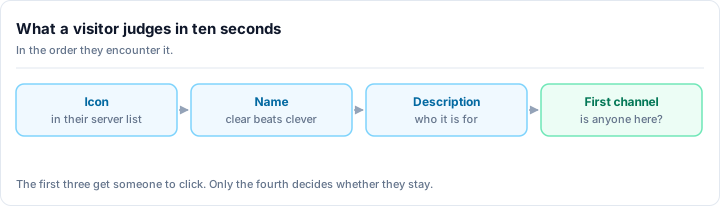
A Discord server's visual identity is often the first impression members get. A professional-looking server signals that someone cares about the community; a sloppy one signals abandonment.
According to 2025 community research, servers with consistent branding see 3x longer member retention than servers without. Visual identity matters.
The Core Brand Elements
1. Server Icon (Non-Negotiable)
Your server icon is your logo, and it's the visual anchor of your entire community. It appears in the server sidebar at sizes as small as 32x32 pixels, in member profiles, in discovery results, and on mobile apps - meaning it needs to work everywhere. Design your icon with clarity at that smallest size as your priority: zoom in and verify you can still identify what it represents. Use high contrast between your icon and its background, avoid fine details that disappear at small sizes, and stick to one dominant color so nothing gets muddy. Simple geometric shapes, clear mascots, single bold letters, or symbols representing your community's topic all work well. What doesn't work are busy photos, tiny text, excessive detail, or trendy designs that age quickly. A professional-looking server icon signals that someone cares about the community, and according to 2025 research, servers with consistent branding see 3x longer member retention than those without.
Design guidelines:
- Clear at 32px: This is your minimum. Zoom in on your icon at 32x32. Can you tell what it is? If not, redesign.
- High contrast: Dark icon + light background, or vice versa
- Avoid fine details: Thin lines disappear at small sizes
- Use one dominant color: Multiple colors get muddy
What works:
- Simple geometric shapes (circle, square with letter)
- Clear mascot or character
- Single letter or number in bold font
- Symbol representing your community's topic
What doesn't work:
- Busy photos
- Tiny text
- Lots of detail
- Overly trendy designs (they age quickly)
2. Server Banner (Level 2 Boost)
If your server reaches Nitro Boost Level 2, add a banner. It appears when hovering over your server name.
Requirements: 2560x1440px (or any 16:9 ratio)
Design tips:
- Large, readable text (your server name or tagline)
- Eye-catching but not overwhelming
- Include your server's key visual (icon, color scheme)
- Make it match your icon
Example: A gaming server's banner might have the game logo, server name, and a tagline like "Find Your Squad."
3. Color Palette
Choose 2-3 accent colors used consistently:
- Color 1: Primary (used in role colors, highlighted channels)
- Color 2: Secondary (used in embeds, banners)
- Color 3: Accent (warnings, alerts)
Use colors for:
- Admin role colors (not random)
- Category colors (if using colored categories)
- Embed footers and highlights
- Important announcement pins
A consistent color palette builds subconscious recognition. When people see your server's colors, they think "oh, that's the gaming community."
Channel Organization & Naming
Naming Convention
Pick one and stick to it:
- Lowercase + dashes: #introductions, #off-topic, #gaming-help
- Emoji prefix: 📌introductions, 🎮gaming-help, 💬off-topic
- Avoid: MiXeD CaSe, overly long names (#very-long-channel-name-that-nobody-wants-to-type)
Why consistency matters: New members should be able to guess channel purposes from names. #gaming-help is obvious. #channel-1723 is not.
Category Organization
Group channels by function:
- Info: Rules, announcements, FAQ, about
- General: Introductions, off-topic, memes
- Gaming: #gaming-chat, #looking-for-group, #game-recommendations (for gaming servers)
- Voice: General voice, gaming voice, AFK
- Staff: Mod chat, mod logs, admin (hidden from members)
Members should be able to navigate without explanation.
Building Brand Voice
Welcome Message
Your welcome message should:
- State your server's purpose in one sentence
- Explain what makes it different
- Tell new members what to do next
Bad: "Welcome to our server!" Good: "Welcome to RetroGaming Hub-a community of 8-bit and 16-bit enthusiasts sharing favorites, trading games, and speedrunning classics. Start in #introductions, then explore by genre."
Server Description & Topic
Use your server's description:
- Topic: One-liner (Retro Gaming Community | Est. 2023)
- Description: 2-3 sentences explaining what's here and who it's for
Visual Consistency Across Platforms
If you have a Discord, website, or social media:
- Use the same icon across all platforms
- Use the same color palette
- Use the same tone/voice in announcements
- Reference each platform in the others (Discord link on website, website link in Discord pins)
Members shouldn't think "is this the official community?" Consistency answers that question.
Maintenance & Refresh
Good branding requires maintenance:
Monthly
- Keep #announcements pinned and current
- Archive old channels
- Review channel descriptions for accuracy
Quarterly
- Audit channel organization-is anything in the wrong category?
- Check if server description still fits
- Update roles or remove unused ones
Annually
- Consider refreshing icon or banner (don't change core colors)
- Review if channel structure still works (servers evolve)
- Celebrate community milestones in #announcements
The Bottom Line
A well-branded server isn't about perfect design-it's about intentional consistency. A clear icon, organized channels, consistent naming, and professional welcome messages signal that someone cares. Members notice, and they stay longer.
Spend 1-2 hours now on branding, and you'll benefit for years.
Ready to build a recognizable community? Add your server to Rally to reach members searching for well-branded communities like yours.