Most server owners obsess over member count - a vanity metric that hides the truth. A 500-member server with 50 daily active users is healthier than a 5,000-member server with 20 daily active users.
Server health = retention + engagement, not member count.
This guide covers what to actually measure - growth, activity, retention, and engagement - where Discord's native analytics help (and where they leave you stranded), and how to see real activity for a server of any size.
The four things worth measuring
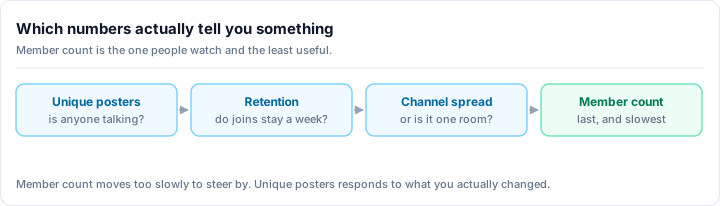
Forget the dashboard for a second. Every healthy-community question comes down to four categories. Growth asks whether new people arrive at a steady rate - joins per week matter far more than lifetime member totals, and consistent new arrivals beat one-time spikes. Activity measures whether people actually talk through messages per day and voice hours, separating living communities from ghost towns with inflated numbers. Retention tracks whether new members stay, the single most predictive metric of long-term health, since growth becomes a leaky bucket if people vanish within a week. Engagement reveals how deeply active members participate through messages per active member, reactions, and repeat voice sessions, distinguishing lurking crowds from real communities. Server health is retention plus engagement, not member count - a 500-member server with 50 daily active users is healthier than a 5,000-member server with 20 daily active users. Everything else is just a way of reading these four categories through metrics you can actually pull.
Growth - Are new people arriving, and at a steady rate? Joins per week matter far more than a lifetime member total. A consistent trickle of new members beats a one-time spike that never returns.
Activity - Are people actually talking? Messages per day and voice hours tell you whether the server is alive or a ghost town with a big number at the top.
Retention - Do new members stay? This is the single most predictive metric of long-term health. If people join and vanish within a week, growth is a leaky bucket.
Engagement - How deeply are active members participating? Messages per active member, reactions, and repeat voice sessions separate a lurking crowd from a real community.
Everything below is just a way of reading these four through the metrics you can actually pull.
Discord's built-in Server Insights
Discord ships native analytics called Server Insights (Server Settings then Insights). It is genuinely useful, with two important limits to know up front.
Two catches with native Insights
Server Insights only unlocks for servers with 500 or more members, and its numbers lag by roughly a day. If your server is smaller than that - or you need to see what is happening right now - native Insights will not help you yet.
For servers that qualify, Insights shows:
Daily Active Users (DAU): Members who sent a message or used voice that day. This is your actual community size.
Member Growth: New members joining per week. Expect seasonal spikes after events or marketing.
Retention: Percentage of new members still active 7 and 28 days later. This reveals whether your onboarding works.
Messages Per Day: Total messages sent daily. The trend indicates engagement.
Voice Activity: Hours of voice channel usage. Social and gaming servers should see higher numbers here.
You do not need a bot to use native Insights once you cross 500 members - it is a first-party Discord feature. The problem is the gap underneath it: the servers that most need to understand their growth are usually the small ones that have not unlocked it, and even large servers are stuck looking at yesterday's data.
See activity for any size server, in one place
This is the gap Rally Bot closes. Add it to your server and it records the same core signals - message and voice activity, member growth, and activity heatmaps showing when your community is most alive - for a server of any size, with no 500-member gate. It all lands in one free web dashboard alongside the rest of your server management, so analytics live next to the tools you use to act on them.
A few things make this practical rather than just another chart:
- No member threshold. A 40-member server gets the same activity tracking as a 40,000-member one. You can read your trends from day one.
- History is recorded for you. Because the bot logs activity continuously, your week-over-week and month-over-month trends are already waiting when you go to look - no spreadsheet ritual required.
- One dashboard, not a tool sprawl. Rally Bot is an all-in-one bot, so moderation, leveling, roles, welcome, and the rest sit in the same place as your stats. If you are weighing bot options generally, our best Discord bots guide breaks down the full picture.
And it is free. Rally has no premium tier - every feature, analytics included, is available to every server at no cost.
Add Rally Bot to your server - free, no credit card, no locked features.
Why analytics stay free
Rally earns through server discovery - boosts and featured placements - not by paywalling bot features. So there is no business reason to ever lock activity stats behind a subscription, which is exactly what happens on bots whose revenue depends on it. (For reference, the common premium tier elsewhere runs around around $12 a month.)
Analytics and discovery: the part most tools miss
Here is the Rally angle no other analytics tool offers. Installing Rally Bot also lists your server on Rally's discovery platform, where communities are ranked by real activity rather than raw member totals.
That ties your analytics directly to growth. The same activity you are measuring - active members, message volume, voice time - is the same signal that decides how high your server surfaces to people searching for a community like yours. Improve your engagement metrics and you do not just get a healthier server; you get a more discoverable one. New members find active servers, and active servers stay active.
It is a feedback loop the classic analytics bots cannot give you, because they only ever look inward at numbers and never connect those numbers to reaching new people.
The metrics that actually matter
However you pull your data, these are the ones to watch.
Metric 1: Daily Active Users (DAU)
What it measures: Members who participated (message or voice) today.
Why it matters: Your actual community size, not a vanity count.
Healthy trend: Stable or slowly growing (20-30% month-over-month is excellent).
Declining DAU means:
- Members are not finding reasons to return
- Moderation scared people away
- Events stopped
- Leadership is absent
Metric 2: New Member Retention (7-Day and 30-Day)
What it measures: % of new members still active after 7 and 30 days.
Healthy rates:
- 7-day: 50%+ healthy, 70%+ excellent, below 30% is broken
- 30-day: 30%+ normal, 50%+ excellent
If retention is low:
- Onboarding is broken (fix the welcome process, intro channel, day-3 check-in)
- New members do not feel welcomed
- There are no clear first-time activities for them
- Clique behavior excludes new people
Metric 3: Messages Per Active Member
What it measures: Average messages per DAU (total messages divided by DAU).
Healthy target: 3-5 messages per active member per day (varies by server type).
A declining number means:
- Members are lurking more
- Staff participation dropped
- Conversation quality declined
- Topics shifted to less-engaging content
Metric 4: Voice Hour Trends
What it measures: Total hours of voice channel usage.
For gaming and social servers: Should trend upward with engagement.
For text-focused servers: Expected to be low, which is normal.
Metric 5: New Members Per Week
What it measures: Your growth rate.
Healthy:
- Stable or slowly growing (100+ member servers might see 5-10 new members per week)
- Seasonal spikes around marketing or events are normal
- A consistent 0 means the server is not discoverable
The vanity metrics to ignore
Total member count
Why it is garbage: A server with 10,000 members but 30 DAU is dead. A server with 300 members but 150 DAU is thriving.
The problem: It is easy to game (raids, bots, incentive farms), and it hides real community health.
Use it for: Context only, as in "we have 5,000 members and 200 DAU."
Boost count
Why it is misleading: It reflects spending power, not community health. A single generous member can boost a dead server to Level 3.
Use it for: Available features only (animated icon at Level 1, banner at Level 2, vanity URL at Level 3).
Setting up analytics tracking
Weekly tracking template
If you are not letting a bot record history for you, keep a simple spreadsheet:
| Date | DAU | New Members | Messages | Voice Hours | 7-Day Retention | Notes |
|---|---|---|---|---|---|---|
| Feb 26 | 45 | 3 | 120 | 12 | 55% | Event night |
| Mar 5 | 42 | 2 | 98 | 10 | 48% | Slower week |
Review weekly:
- Is DAU trending up or down?
- Is retention stable?
- Are message volumes healthy?
- What external factors explain the changes?
Monthly review
- Graph the trends (DAU especially)
- Identify 1-2 metrics that need improvement
- Plan actions: "if DAU is declining, we will run two more events this month"
- Celebrate wins: "retention improved to 60%!"
The diagnosis framework
When metrics decline, work through this in order:
- Identify which metric declined (DAU, retention, messages, voice time)
- When did it start? A specific date helps pinpoint the cause
- What changed that week? A moderation update, a skipped event, a popular member leaving
- What is your hypothesis? For example, "we skipped events, so DAU declined"
- Test the fix: Run events again and see if DAU rebounds
Most server problems are fixable once you diagnose the root cause - and the diagnosis only works if you have the history to look back at, which is the whole argument for tracking continuously instead of guessing.
The bottom line
Track the right metrics (DAU, retention, message volume) and ignore the rest (member count, boost level). Review weekly, act monthly. A 100-member server with 50 DAU and 60% 7-day retention is healthier and more valuable than a 10,000-member dead server.
The hard part has never been the math - it is having the data. Discord's native Insights is solid once you pass 500 members and can tolerate a day of lag. Below that, or for live activity in the same dashboard as the tools you act with, a free all-in-one bot is the simplest answer.
Ready to see what your community is actually doing? Add Rally Bot to your server - free, no premium tier, no locked stats. You get live activity analytics for any size server, and a listing on Rally's activity-ranked discovery platform so active communities keep surfacing to new members. Then explore thriving gaming communities and community servers on Rally to see healthy engagement in the wild.