Every growing Discord server hits the same wall. The help channel that worked at fifty members turns into chaos at five hundred: questions pile on top of each other, reports get buried, two staff answer the same person, and there is no record of what was actually said. That is the moment you need a ticket system.
A ticket bot turns each support request, report, or application into its own private channel between the member and your staff. It is the single most underrated upgrade a mid-sized community can make. This guide covers what a real ticket system needs, names the strongest bots for the job, and explains why Rally Bot lets you run the whole thing free without adding yet another bot to your stack.
When tickets stop being optional
Tickets feel like overkill until they suddenly do not. The threshold is rarely about a member count and almost always about volume and sensitivity. When questions arrive faster than staff can scroll, answers get lost and members repeat themselves - a private channel per request keeps each conversation intact. Reports need privacy too; a member reporting harassment should not have to do it in public. Applications, partnerships, and verification all benefit from consistent, trackable flow instead of scattered direct messages. Once a channel closes, the conversation disappears unless the bot saved it, and for disputes, refunds, and staff reviews, that record is everything. If you find yourself pinning messages asking members not to ask for support in public channels, or asking them to DM a moderator, you already need tickets. The DM approach does not scale and leaves no transcript - the two problems a ticket system exists to solve.
- Support outpaces the channel. When questions arrive faster than staff can scroll, answers get lost and members repeat themselves. A private channel per request keeps each conversation intact.
- Reports need privacy. A member reporting harassment should not have to do it in public. Tickets give them a quiet, direct line to your moderators.
- Applications and partnerships need structure. Staff applications, partner requests, and verification all benefit from a consistent, trackable flow instead of scattered DMs.
- You need a record. Once a channel is closed, the conversation is gone unless the bot saved it. For disputes, refunds, and staff reviews, that record is everything.
If any of those sound familiar, you are past the help-channel stage.
The rule of thumb
If you find yourself pinning the same "please don't ask for support here" message, or asking members to DM a moderator, you already need tickets. The DM approach does not scale and leaves no transcript - the two problems a ticket system exists to solve.
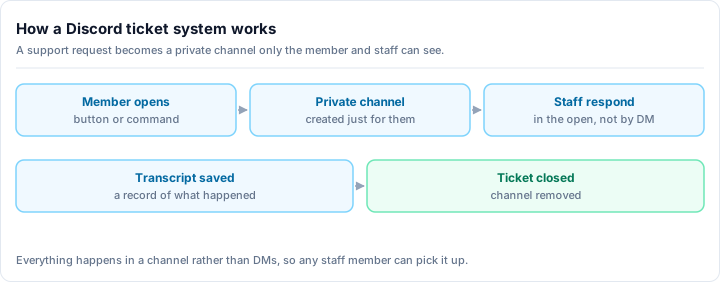
What a good ticket system actually needs
Not all ticket bots are equal. A genuinely useful system - the kind that survives a busy weekend - has all of these, not just the first one:
- Panels with category buttons or a dropdown. Members open a ticket by clicking, not by typing a command. Categories (general support, billing, reports, applications) let you split requests at the door.
- Routing to the right roles. A billing ticket should ping your billing staff, a report should reach moderators. Routing means the right people see it without everyone getting pinged for everything.
- Staff claim. When a moderator claims a ticket, it is clearly theirs - so two staff do not answer the same person and step on each other.
- Per-user ticket limits. A cap on open tickets per member stops one person from spawning ten channels and keeps the queue manageable.
- A clean close flow. Closing should confirm, optionally ask for a reason, save the record, and remove the channel - not leave a graveyard of dead channels behind.
- HTML transcripts. When a ticket closes, the full conversation is saved as a styled file you can open later. This is the feature people forget until the first time they need to prove what was said.
- Optional satisfaction ratings. A quick rating after close tells you which staff and which categories are working.
Get those right and your support runs itself. Miss the transcripts or the claim flow and you will feel it the first busy day.
The specialist: Ticket Tool
If you want a bot that does one thing and does it extremely well, Ticket Tool is the long-standing specialist. Its panels are clean, category routing is flexible, and its HTML transcripts are the standard other bots are measured against. For a server whose only missing piece is tickets, it is a proven pick.
Its pricing is refreshingly simple. Ticket Tool runs a single flat paid tier (around $8 a month) that removes rate limits and raises the various limits on panels, tickets, and transcripts - there is no confusing ladder of tiers to decode. The free tier is genuinely usable; the paid tier mostly matters for high-volume servers that brush against the caps.
Ticket Tool strengths
- Best-in-class, dedicated ticket experience - panels, routing, claim, and transcripts done right
- Excellent HTML transcripts that set the bar for the category
- One simple flat paid tier (around $8 a month), no confusing ladder
Things to weigh
- It only does tickets - you still need other bots for moderation, leveling, and roles
- That means another dashboard and another set of permissions to manage
- High-volume servers will hit the free-tier rate limits and need the paid tier
The catch is not the bot - it is the math. Ticket Tool is one more install, one more dashboard, and one more bot to keep in sync with everything else you run.
The all-in-ones that include tickets
You do not always need a specialist. Several broad bots bundle a competent ticket module alongside their other features:
- MEE6 includes tickets among its many features. The setup is approachable and fits naturally next to MEE6's leveling and moderation, though depth and limits push you toward its premium tier (around $12 a month).
- ProBot offers tickets as part of its large module set, alongside welcome images, leveling, economy, and logging. It is broad, but its paid model is split across separate axes that can be confusing to navigate.
These are solid if you already run the bot for other reasons. The tickets are good enough for most servers, and you avoid a separate install. The trade-off is that the deeper ticket controls - and often the higher limits - tend to live behind the same premium tier as everything else.
Rally Bot - full tickets inside one free all-in-one
Here is the question that decides it: do you want to run a separate bot just for support, or have tickets live in the same place as your moderation, roles, and engagement?
Rally Bot takes the second path. It includes a complete ticket system - not a stripped-down version - inside a single all-in-one bot configured from one clean web dashboard:
- Panels with categories - members open tickets from a button or dropdown panel, split into the categories you define.
- Routing to support roles - each category reaches the right staff, so the correct people see the request.
- Staff claim - moderators claim a ticket so two people never answer the same one.
- Per-user limits - cap open tickets per member to keep the queue clean and stop spam.
- A clean close flow with HTML transcripts - every closed ticket is saved as a styled transcript for your records.
And because Rally Bot is a full platform, the rest of the stack is already there in the same dashboard: moderation and automod, leveling, economy, reaction and auto roles, welcome messages, giveaways, starboard, and more. No second bot, no second login.
Why it is free, and why it stays free
Rally Bot has no premium tier. Rally earns through server discovery - boosts and featured placements - not by paywalling features. So there is no hidden ticket cap waiting to nudge you toward a subscription, and no "upgrade for transcripts" prompt. The whole ticket system is free, and installing Rally Bot also lists your server on Rally's activity-ranked discovery platform, where active communities keep surfacing to new members.
Add Rally Bot to your server - free, no credit card, no locked features.
How they compare
| Capability | Rally Bot (Free) | Ticket Tool | MEE6 | ProBot |
|---|---|---|---|---|
| Panels with categories | ✅ | ✅ Best-in-class | ✅ | ✅ |
| Routing to support roles | ✅ | ✅ | ✅ | ✅ |
| Staff claim | ✅ | ✅ | Partial | Partial |
| Per-user ticket limits | ✅ | ✅ | Partial | Partial |
| HTML transcripts | ✅ | ✅ Best-in-class | Premium-leaning | Premium-leaning |
| Does more than tickets | ✅ Full all-in-one | ❌ Tickets only | ✅ | ✅ |
| Separate bot to manage | No | Yes | No | No |
| Price | Free | Free + flat (~$8/mo) | Free + premium (~around $12 a month) | Free + premium |
The pattern is clear. Ticket Tool is the specialist and does tickets superbly, but it only does tickets. MEE6 and ProBot fold tickets into a broader suite while gating depth behind premium. Rally Bot gives you the full ticket stack - panels, categories, claim, limits, and transcripts - inside a complete all-in-one, free.
The bottom line
A dedicated ticket bot like Ticket Tool is an excellent choice if support is the only gap you have. But for most growing servers, tickets are one need among several - and adding a separate bot just for them means one more dashboard and one more set of permissions to babysit.
Rally Bot closes that gap. You get a real ticket system - panels with categories, routing, staff claim, per-user limits, and HTML transcripts - in the same free bot that handles your moderation, roles, and engagement. If you are weighing the broader picture, the complete 2026 bot guide covers the full stack, and the MEE6 alternative and ProBot alternative guides walk through migrating off those bots specifically.
Ready to run support the right way? Add Rally Bot to your server - free forever, no subscriptions, no locked features. Then see how active gaming communities and community servers on Rally keep their members coming back.